Strategy ONE
View filters in documents with multiple datasets
If a document contains multiple datasets, a view filter on a Grid/Graph can include any objects from any of the datasets, regardless of whether the Grid/Graph uses that dataset.
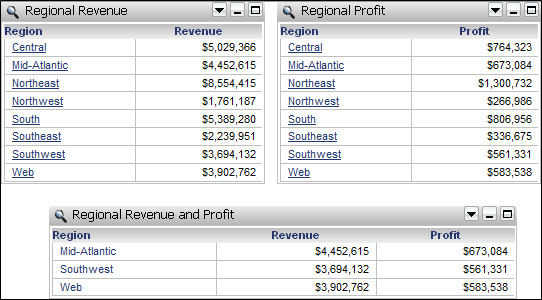
For example, a document contains two datasets, Regional Revenue and Regional Profit. A Grid/Graph is displayed for each dataset, with the data source displayed in the title bar, as shown below:

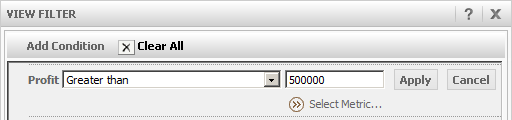
Create a view filter on the Regional Revenue Grid/Graph. Filter on the Profit metric greater than 500,000, as shown below:
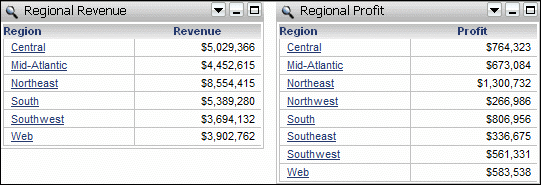
The results are shown below. Notice that Northwest and Southeast are no longer included in the Regional Revenue Grid/Graph, since their profit amounts are below $500,000.
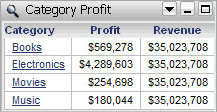
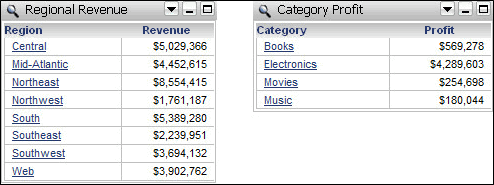
If the datasets do not contain the same attributes, you can still create a view filter that includes any object from any dataset on the document. For example, a document contains two datasets, Regional Revenue and Category Profit. Create a Grid/Graph for each dataset, as shown below:

Create a view filter on the Category Profit Grid/Graph, for Revenue less than $5,000,000. When the view filter is applied, Category Profit no longer contains any data, as shown below:

To process the view filter, Revenue is aggregated on the Category Profit Grid/Graph. Revenue is available on the document only at the level of Region, which is not available on the Category Profit dataset. Therefore, Revenue aggregates to the level of all regions, calculating the same value for each row of the Category Profit Grid/Graph. This value is $35,023,708, which exceeds the view filter, and therefore no data is returned. Adding the Revenue metric to the Category Profit Grid/Graph displays the aggregated Revenue amount, to help explain how the view filter is calculated, as shown below:
If you add a view filter on Profit greater than $500,000 to the Regional Revenue Grid/Graph, the Regional Revenue Grid/Graph does not change, as shown below:
The view filter works the same way. Profit is aggregated on the Regional Revenue Grid/Graph at the level of all categories. This value is $5,293,624, as shown below, which meets the view filter limit, so all rows are displayed.

View filters in Grid/Graphs that use multiple datasets
A Grid/Graph can display data from more than one dataset. The view filter on this type of Grid/Graph can also include any objects on the Grid/Graph.
For example, a document contains two datasets, Regional Revenue and Regional Profit. A Grid/Graph is displayed for each dataset, with the data source displayed in the title bar. Another Grid/Graph, named Regional Revenue and Profit, combines the data from both datasets, as shown below:
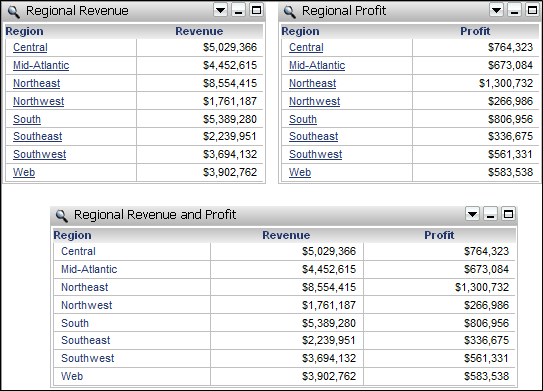
Create a view filter on the Regional Revenue and Profit Grid/Graph for Revenue less than $5,000,000 and Profit greater than $500,000. The results are shown below: