Strategy One
Sensitive Data Alert
Strategy One (December 2025) adds Mosaic Sentinel to the Mosaic suite which allows you to audit your security risks without moving data or vendor lock-in.
To reduce unnecessary alerts, you can exclude user groups with normal access patterns to sensitive data so that only true anomalies trigger alerts.
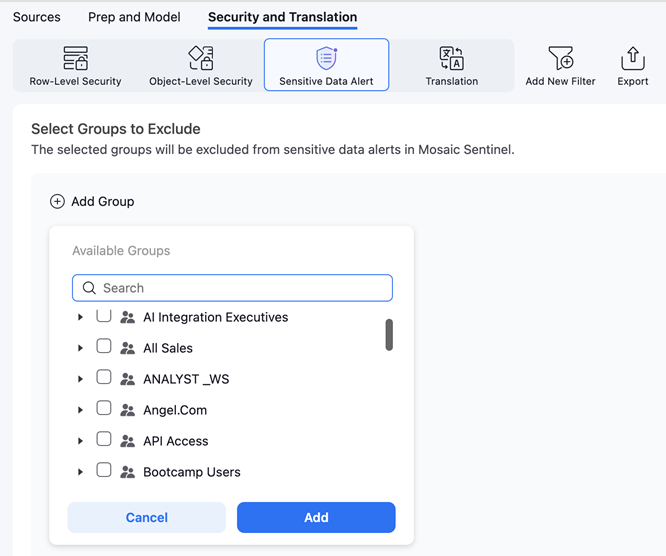
For example, if you do not want members of the HR group to trigger alerts whenever they access salary data, the Mosaic model owner can add the HR group to Sensitive Data Alert, as shown below. With this configuration, normal and expected access patterns will no longer generate alerts, only anomalous behavior will.
-
Click Save.
-
Click Security and Translation in the top left.
-
Click Sensitive Data Alert.
-
In Select Groups to Exclude, click Add Group.
-
Find the groups you do not want to access personal information and select the check box next to it.
-
Click Add.
-
To add more groups, click Add
 .
. -
To remove groups, hover over the group and click Delete
 .
. -
Click Save.