
Strategy One
Mosaic Model Validation
Starting in Strategy One (March 2026), you can validate your Mosaic models while creating or editing your models without having to a build a dashboard or complete the full deployment process. Quickly preview data and the underlying query to ensure your model behaves as expected.
-
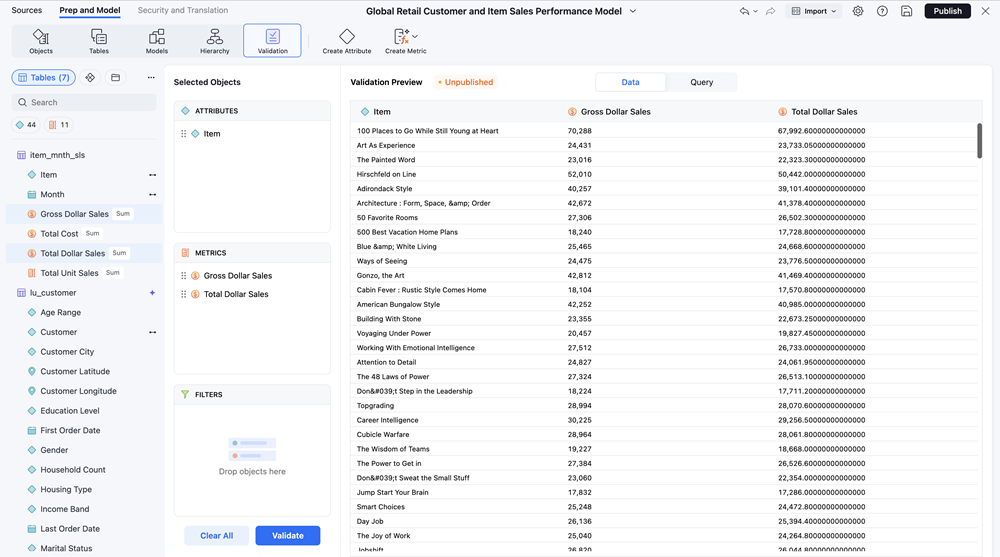
In the Prep and Model page, click Validation.
-
Click and drag Attributes and Metrics into their respective panel.
-
Click Validate.
-
If applicable, click Save and Publish.
For more information on this dialog, see Additional Information.
-
Click the following tabs above the grid to change your display preference:
-
Data: Displays the data for the selected objects.
-
Query: Displays the query result for the selected objects.
-
-
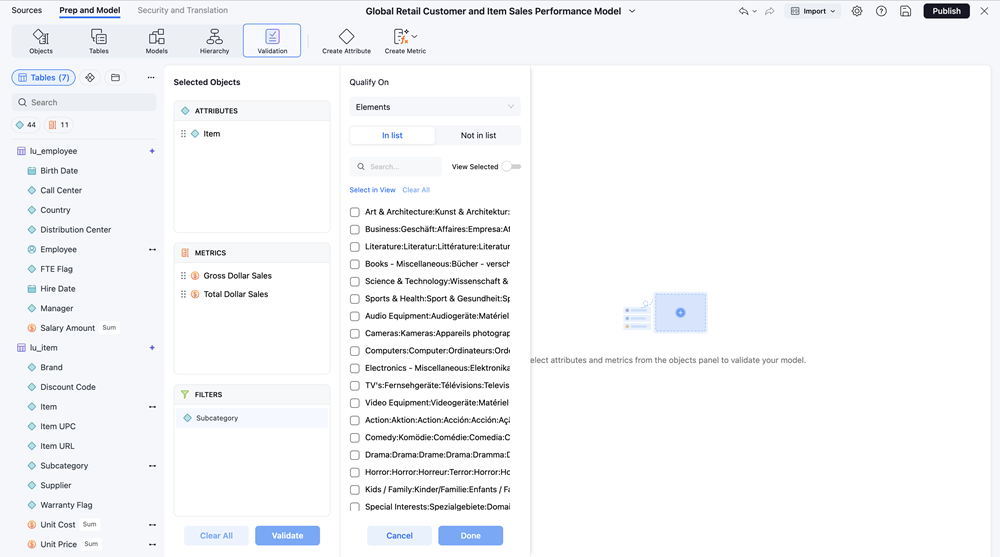
To filter the results, click and drag an attribute to the Filters panel.
-
View the available elements and select the check box(es) next to one or more elements.
Filtering also supports Qualify On attribute forms.
-
Click Validate.
-
Make any necessary changes and validate the model again, if needed.
Additional Information
-
Validation supports Mosaic models in Import mode and Live mode. It also supports Mosaic model links.
-
You must Save and Publish the Mosaic model before running validation in the following Import mode scenarios:
-
The model uses tables from a non-relational data source.
-
The model uses tables from more than one relational data source.
-
The model performs any data preparation operations.
-