Strategy One
Alternate Keyword Matching
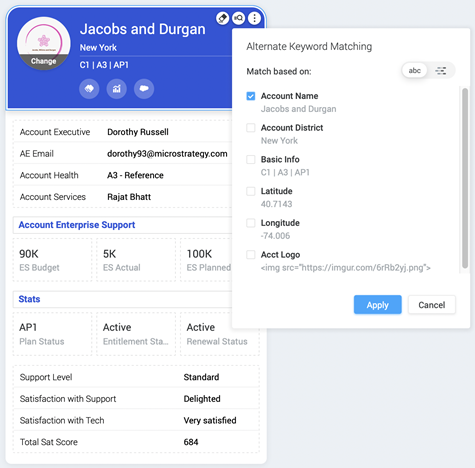
Alternate keywords do not replace a keyword attribute. Rather, they identify words or numbers that are synonymous with a keyword attribute so that both alternate keywords, and the keyword attribute appear in your browser.
As of MicroStrategy 2020 Update 2, you can use keyword matching or pattern matching to trigger cards in HyperIntelligence for Web and HyperIntelligence for Office.
-
Before enabling the default keyword matching, you may want to create multi-form attributes to increase the probability of relevant matches on your keyword. For steps to create a multi-form attribute for Alternate Keyword Matching, see Allow Alternate Forms of a Keyword.
-
HyperIntelligence for Web can support up to 500,000 keywords, including synonyms, at once. To stay within this limit, only enable the necessary number of cards. However, pattern-enabled cards do not have this restriction, since pattern matching handles larger datasets by defining character patterns on keywords. This method does not require downloading keywords to the browser's storage, resulting in better and faster performance. For more details, see KB484307: Pattern Matching vs. Keyword Matching.
Enable Keyword Matching
Keyword matching is the default matching on keywords by downloading and caching all the keywords on the browser storage, and then scanning the website for possible matches.
- Use a multi-form attribute as your keyword attribute.
- In the Card Editor, select the Alternate Keyword Matching icon.
- Select the Synonym # to add to keyword matches.