
Strategy ONE
Filter Panel
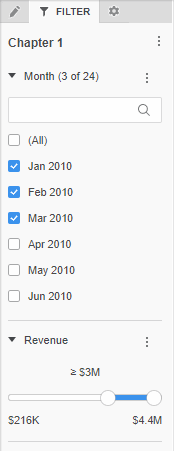
The Filter panel displays a list of all filters for the current chapter. The selections you make in the Filter panel affect every visualization in the current chapter in the dashboard. A filter on a chapter also filters the data in any dataset objects (that is, attributes and metrics) in text fields on the chapter.
If Apply Selections To > All Chapters Containing This Filter is enabled, then any changes you make to the filter affect other chapters that contain the same filter.
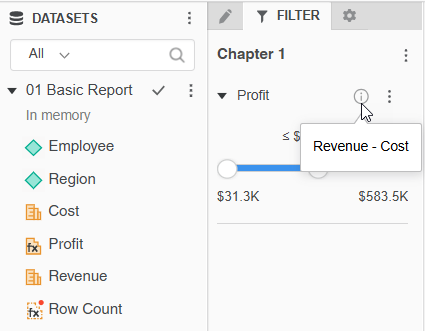
Starting in MicroStrategy ONE (December 2024) for Workstation and Library Web, and in Strategy One (March 2025) for Library iOS, if the Display Filter and Selector Description dashboard property is enabled, object descriptions display as tooltips in filters. For example, a dashboard contains a derived metric, Profit, with the description Revenue - Cost. The property is enabled, so the information icon  displays in the Filter panel. Hover your cursor over the information icon to display the description.
Access
- Open an existing dashboard or create a new one.
- The Editor, Filter, and Format panels are stacked together by default. Click Filter
 to open it.
 - If the Filter panel is not available, do one of the following:
Starting in Strategy One (November 2025), click the Filter
icon in the left toolbar. Prior to Strategy One (November 2025), from the View menu, select Editor Panel to display all three panels. Click Filter
to open it.
-
You can change the location of the panel by dragging it to a different area of the screen. For example, you can drag only the Filter panel to the left, leaving the Editor and Format panels stacked.
-
Starting in Strategy One (November 2025), you can place the Editor, Filter, and Format panels above and below each other as though in a column. To do this, drag one panel to the bottom of another. You can then adjust the relative height of the panels by hovering your cursor over the line dividing the panels and dragging the resizing icon up or down.
Tasks
Use the Filter panel to perform the following tasks: