
Strategy ONE
MDX Verify Limit Filter Literal Level
MDX Verify Limit Filter Literal Level is an advanced property that is hidden by default. For information on how to display this property, see Viewing and Changing Advanced VLDB Properties.
This VLDB property supports a unique scenario when analyzing MDX cube reports. An example of this scenario is provided below.
You have an MDX cube report that includes a low level attribute on the report, along with some metrics. You create a filter on the attribute's ID form, where the ID is between two ID values. You also include a filter on a metric. Below is an example of such an MDX cube report definition:
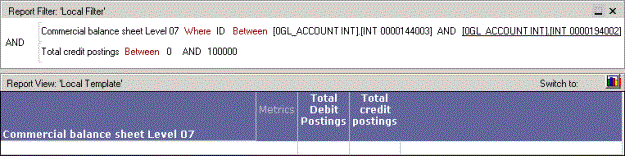
When you run the report, you receive an error that alerts you that an unexpected level was found in the result. This is because the filter on the attribute's ID form can include other levels due to the structure of ID values in some MDX cube sources. When these other levels are included, the metric filter cannot be evaluated correctly by default.
You can support this type of report by modifying the MDX Verify Limit Filter Literal Level. This VLDB property has the following options:
- Do not verify the level of literals in limit or filter expressions (default): While the majority of MDX cube reports execute correctly when this option is selected, the scenario described above will fail.
- Verify the level of literals in limit or filter expressions: Selecting this option for an MDX cube report allows reports fitting the scenario described above to execute correctly. This is achieved by adding an intersection in the MDX statement to support the execution of such an MDX cube report. For example, the MDX cube report described in the scenario above executes correctly and displays the following data.

Levels at Which You Can Set This
Database instance and report