
MicroStrategy ONE
Drilling on a report with subtotals calculated across levels
A report can be designed to calculate subtotals across selected attribute levels, also referred to as across-level subtotals. The subtotal is applied to particular levels—rows, columns, or pages. Across-level subtotals can be thought of as "group by attributes to the left of the selected attribute". (For a detailed description of across-level subtotals, see the Reports chapter of the Advanced Reporting Help.)
If a report is subtotaled across levels, you can determine whether the subtotals on the drilled-from report are displayed on the drilled-to report. Across-level subtotals are hidden only when all of the following is true:
- Inherit across-level subtotal from parent is set to No.
- Keep parent while drilling is set to No.
- You drill from the object that is the level of the subtotal.
The following example demonstrates how the results of the report change when the above conditions are applied.
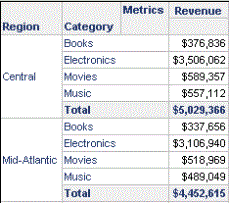
A report contains the Region, Category, and Revenue metrics. Subtotals are calculated across all elements of the attribute Category. The attribute to the left of Category is Region, so the subtotals are grouped and calculated for each region, as shown in the portion of the report displayed below.
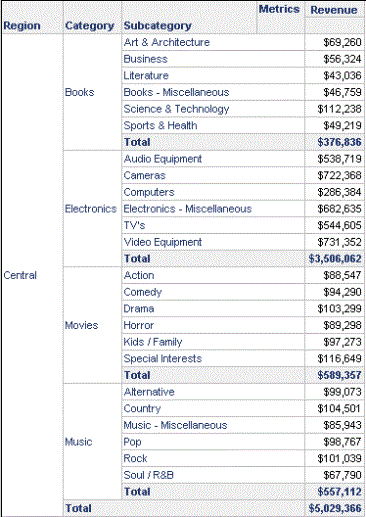
By default, subtotals are inherited from the parent. Drill from Category to Subcategory. In the resulting report, Region, Category, and Subcategory are displayed. Since the subtotals are inherited, subtotals are applied across the levels of both Category and Subcategory. Subtotals are therefore calculated for Category and Region, the attributes to the left of Category and Subcategory. A portion of that drilled-to report is shown below.
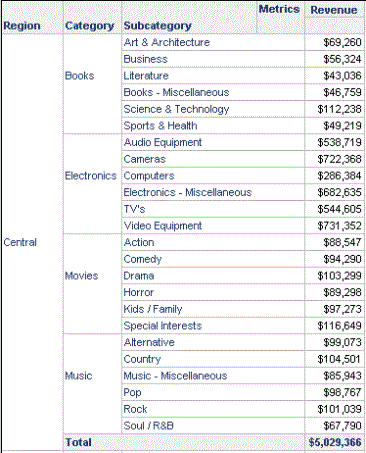
Return to the original, drilled-from report. Specify that subtotals are not inherited from the parent. Drill from Category to Subcategory again. As with the previous drilled-to report, Region, Category, and Subcategory are displayed. Subcategory does not inherit its parent's subtotal (its parent being Category). Subtotals are still applied at the level of Category, so subtotals are calculated for Region, the attribute to the left of Category. A portion of that report is displayed below.
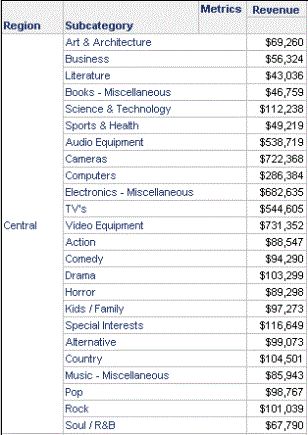
By default, the parent attribute is kept on the drilled-to report, so Category is displayed in these examples. Return to the original, drilled-from report. Specify that the parent is not kept when the report is drilled on. Drill from Category to Subcategory. The resulting report displays Region and Subcategory, with no subtotals. Because Category is no longer on the report, the across-level subtotals are no longer valid. A portion of the resulting report is displayed below.
For information about and examples of the Keep parent while drilling option, see Keeping or removing the drilled-from attribute in the new report.
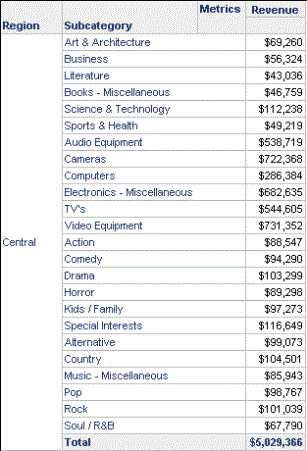
Return to the original, drilled-from report. Specify that subtotals are inherited from the parent. Drill from Category to Subcategory. The resulting report displays Region and Subcategory, as with the previous report, but subtotals are calculated for Region. Subtotals are inherited from the parent, so the across-level subtotals are transferred to the Subcategory. Since Region is to the left of Subcategory, the report is subtotaled at that level. A portion of that report is displayed below.
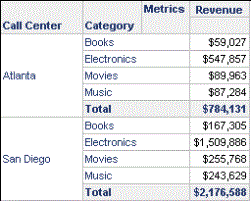
Return to the original, drilled-from report. Drill from Region to Call Center this time, so that you are not drilling on the attribute that the across-level subtotals are defined for. The resulting report displays Call Center and Category. Subtotals are calculated for Call Center, because Call Center is now the attribute to the left of Category. A portion of the resulting report is shown below.
You can change this option for an entire report using MicroStrategy Developer, as described in the procedure below. In Developer, you can specify whether to show or hide subtotals while you are drilling, for that specific drill action. For steps, see Methods for drilling on a report.
To show or hide subtotals when drilling from a report with across-level subtotals
This procedure assumes that the report already contains across-level subtotals. For steps, see the MicroStrategy Developer Help (formerly the MicroStrategy Desktop Help).
- Open a grid report.
- From the Data menu, select Report Data Options.
- Expand General, then select Drilling.
-
Specify whether or not the subtotals are displayed in the drilled-to report:
- To display subtotals in the drilled-to report, set Inherit across-level subtotal from parent to Yes.
- To hide subtotals in the drilled-to report, set Inherit across-level subtotal from parent to No.
- Subtotals are still displayed unless Keep parent while drilling is set to No and you drill from the object that is the level of the subtotal.
- To use the value set in the drill path, set Inherit across-level subtotal from parent to Default. For information about creating drill paths, see the Advanced Reporting Help.
- Click OK