
MicroStrategy ONE
Level Metrics Review: Standard Grouping
This section describes how level metrics can help you answer your report requirements. In particular, it discusses how standard grouping interacts with different filtering options. Report samples, SQL code, and metric definitions are used to explain the results.
Report Requirements
Your company has recently kicked off a new ad campaign targeted at certain areas that present high growth opportunities. In your regions, this consists of the Boston, New York, and Washington, DC call centers. You need to perform an analysis from different perspectives and are looking for answers to the following:
- How do the sales of each call center compare to the total sales of the targeted call centers in a given region?
- How do the sales of each call center compare to the total sales of all the call centers in a given region?
- How do the sales of each call center compare to the total sales of all the call centers in a given region for a given category?
Report 1: Call Center Sales Compared to Total Sales of Targeted Call Centers in a Given Region
Level Metric: Grouping = Standard, Filtering = Standard
In this case, the Regional Sales is equal to the sum of the revenues of the call centers in a given region. This sum takes into account only those call centers that are included in the report filter. For example, the Mid-Atlantic Regional Sales only includes the Washington, DC call center sales as this is the only call center from that region that has been included in the report filter. The metric groups at the target level of region because grouping is standard, as shown in the metric definition below:
Sum(Revenue) {~+, Region+}
With standard filtering, all of the report filter elements are included in the calculation of the metric. This occurs by placing the report filter in the WHERE clause of the SQL pass for this metric, as shown in the following example:
sum(a11.[ORDER_AMT])as REGIONALSALES
from [ORDER_FACT] a11,[LU_EMPLOYEE]a12,
[LU_CALL_CTR] a13
where a11.[EMP_ID] = a12.[EMP_ID]
and a12.[CALL_CTR_ID] = a13.[CALL_CTR_ID]
and a12.[CALL_CTR_ID] in (5, 11, 12)
group by a13.[REGION_ID]
The report is displayed as follows:
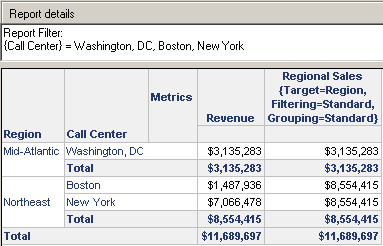
The Revenue subtotals match up with the values of the total Regional Sales.
Report 2: Call Center Sales Compared to Total Sales of All Call Centers in a Given Region
Level Metric: Grouping = Standard, Filtering = Absolute
In this case, the Regional Sales is equal to the sum of revenues of all call centers included in a given region. Grouping continues to occur at the target attribute level of region. The metric definition is shown below:
Sum(Revenue) {~+, Region*}
With absolute filtering, the report filter is present in the subquery of the WHERE clause in the SQL pass for this metric as shown in the following example:
select a13.[REGION_ID]) as REGION_ID,
sum(a11.[ORDER_AMT]) as REGIONALSALES
from [ORDER_FACT] a11,[LU_EMPLOYEE]a12,
[LU_CALL_CTR] a13
where a11.[EMP_ID] = a12.[EMP_ID]
and a12.[CALL_CTR_ID] = a13.[CALL_CTR_ID]
and ((a13.[REGION_ID])
in (select s21.[REGION_ID]
from [LU_CALL_CTR] s21
where s21.[CALL_CTR_ID] in (5,11,12)))
group by a13.[REGION_ID]
The report is shown in the following figure:
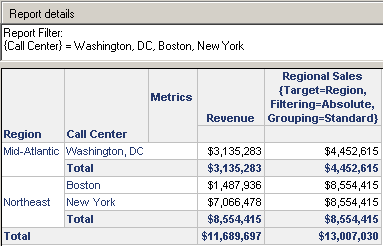
- The Regional Sales values for the Mid-Atlantic region do not match the Revenue values because the Regional Sales metric includes all the call centers in the region, regardless of whether they are included in the report. The report filter is applied to the Revenue metric, so only Washington, DC is included in the subtotal. Likewise, the grand totals for the two metrics do not match.
- With absolute filtering, the report filter is placed in the subquery of the WHERE clause only if it is of a lower level than the target. If the report filter is of a higher level than the target, there is no need for a subquery and so the engine does not use one.
- The VLDB properties of the report can be changed to use two passes of SQL rather than a subquery. VLDB properties related to metrics are discussed in Metric-Specific VLDB Properties: SQL and Analytical Customization.
Report 3: Call Center Sales Compared to Total Sales of All Call Centers in a Given Region for a Given Category
Level Metric: Grouping = Standard, Filtering = Ignore
In this case, the engine ignores the report filter and the report displays the Regional Sales as the sum of revenues of all the call centers in that region. The metric definition is shown below:
Sum(Revenue) {~+, Region%}
With no filtering, the report filter elements that are directly related to the target attributes are not placed in the WHERE clause of the SQL pass for the metric as shown in the following example:
select a13.[REGION_ID]) as REGION_ID,
sum(a11.[ORDER_AMT])as REGIONALSALES
from [ORDER_FACT] a11,[LU_EMPLOYEE]a12,
[LU_CALL_CTR]a13
where a11.[EMP_ID] = a12.[EMP_ID]
and a12.[CALL_CTR_ID] = a13.[CALL_CTR_ID]
group by a13.[REGION_ID]
If the report filter contains attribute elements such as category, these attributes are not ignored because they are not directly related to the target attribute region.
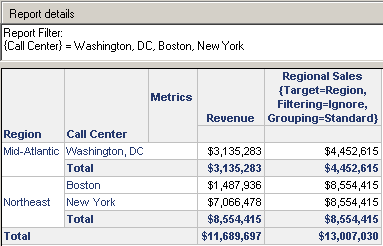
In the following example, since call centers are directly related to the target attribute region, the entire report filter is ignored for the Regional Sales metric. Regional Sales calculates values for all the call centers in each region, regardless of whether the call centers are shown on the report. This explains why Regional Sales values for the Mid-Atlantic region are higher than the Revenue values.
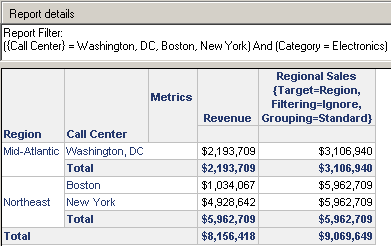
In the example that follows, the Electronics category is included in the report filter. For Regional Sales, the conditions in the report filter that are related to the target of Region (in this case, Call Center) are ignored. Since Category is not related, the Regional Sales metric is calculated for Electronics only. Revenue is also calculated for Electronics only.
Security filters are included in the WHERE clause of the level metric's SQL statement even with absolute or ignore filtering. The engine includes the security filter to ensure that there is no breach in security for any level metric. With filtering ignored, the security filter is unioned with the report filter and is applied to the metric also. With absolute filtering, the security filter is applied in the subquery with the report filter.