Strategy ONE
Creating Transformation-Style Analysis
You can create transformation-style analysis with custom MDX by using two types of MDX functions. MDX provides functions:
PrevMemberandNextMemberto move to the previous or next element in the same attribute.- Such as
MTD,WTD, orYTD(month, week, and year to date) to aggregate data based on time hierarchy models.
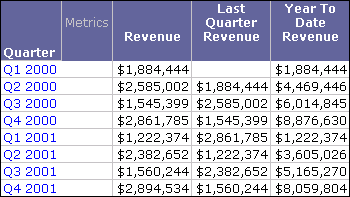
The following custom MDX examples include a one-to-one transformation to display the previous quarter's revenue, and a many-to-one transformation calculating year-to-date revenue:
-
"([Measures].[REVENUE], [Quarter].CurrentMember.Prevmember)"Displays the revenue data for the previous quarter. The Last Quarter Revenue metric shown in the report below is mapped to this custom MDX formula.
-
"sum(YTD([Quarter].CurrentMember), [Measures].[REVENUE])"Displays the total revenue data for all quarters of a given year up to and including the current quarter. The Year To Date Revenue metric shown in the report below is mapped to this custom MDX formula.