
Strategy ONE
Relational analysis with drilling
As with any MicroStrategy report, you can drill on reports that connect to Intelligent Cubes to analyze data at different logical levels.
A report connected to an Intelligent Cube can drill within the data available in the Intelligent Cube it is connected to. This means that you can drill from an attribute on the report grid to an attribute that is not on the report grid, but available in the Report Objects pane. If the attribute is not available in the Report Objects pane, it is not an available drilling option by default. However, Intelligent Cubes can be defined to allow drilling outside of an Intelligent Cube to the full relational data warehouse.
For example, your report includes the attribute Year. After analyzing data at the Year level, you want to analyze data for each quarter. You can drill down from Year to the attribute Quarter to view and analyze data at the new logical level. This drilling action is performed within an Intelligent Cube. Following this example scenario, you want to drill from year 2007 to quarters for that year. You have a report connected to an Intelligent Cube that is defined as shown below:
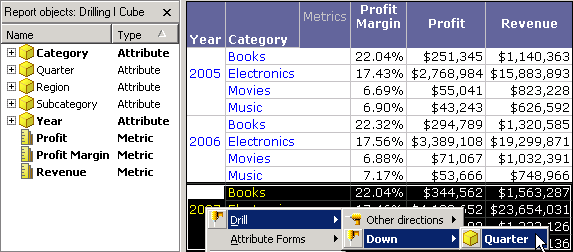
Notice that Quarter is not on the report, but it is included in the Report Objects pane on the left as it is a part of the Intelligent Cube that the report is connected to. As shown in the report above, you right-click the 2007 attribute element for Year and drill down to Quarter. The drilled-to report is shown below.
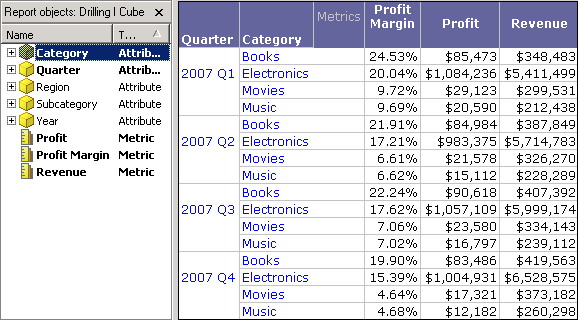
This drilled-to report is executed within and connected to the same Intelligent Cube as the original report. This is verifiable by looking at the Report Objects pane, which shows that the report objects are being returned from the same Intelligent Cube (named Drilling I Cube) as the original report. This provides relational analysis without having to execute the report against the data warehouse.
In the scenario above, drilling is performed within the Intelligent Cube, which is achievable through any report connected to an Intelligent Cube. However, if the Intelligent Cube is defined to allow drilling outside it (see Enabling ROLAP drilling for reports accessing Intelligent Cubes), you can also drill to any object not included in the Intelligent Cube. While drilling outside of an Intelligent Cube requires execution against the data warehouse, it provides access to the full ROLAP schema of the project outside of the Intelligent Cube.
In the next example, the same scenario of drilling from Year to Quarter is used, except that the Intelligent Cube does not contain the Quarter attribute. As shown in the report below, you right-click the 2007 attribute element for Year and drill down to Quarter.
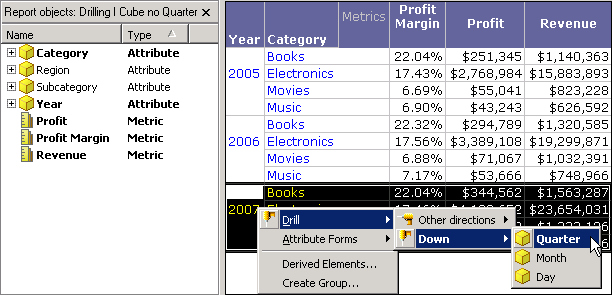
Notice in the report shown above that all the attributes in the Time hierarchy are available drilling options even though they are not all included in the Intelligent Cube. These attributes are available drilling options because the Intelligent Cube is defined to enable drilling outside of the Intelligent Cube. As shown in the report above, you right-click the 2007 attribute element for Year and drill down to Quarter. The drilled-to report is shown below.
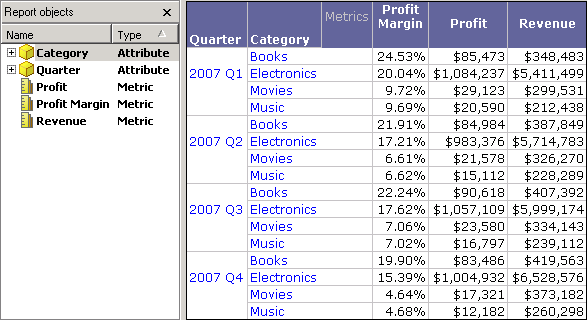
This drilled-to report is executed against the data warehouse, and it allows you to access data outside of the Intelligent Cube for further relational analysis. Notice also that all report objects that were not on the report grid are now removed from the Report Objects pane, because this new, drilled-to report is not connected to the Intelligent Cube.
You should consider the execution time requirements for a report before drilling outside of an Intelligent Cube.
For basics on how to drill on data, see the Basic Reporting Help. For information on creating drill maps, which are used to enable drilling techniques, see the Drill Maps section in the Advanced Reporting Help.