
Strategy ONE
Group derived element
A Group derived element is a combination of attribute elements into a single derived element. All attribute element data is added together to form the metric values for the new Group derived element.
For example, you have a report with Region, Category, and Profit displayed on a report. The report shown below includes the following derived elements defined using groups of Region attribute elements:
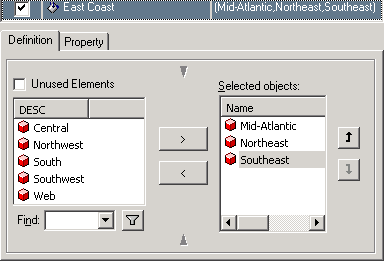
- East Coast: Groups the Mid-Atlantic, Northeast, and Southeast attribute elements.
- West Coast: Groups the Northwest and Southwest attribute elements.
- Central and South: Groups the Central and South attribute elements.
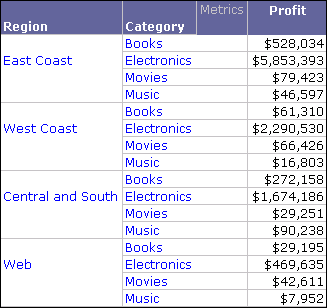
A procedure to create the report shown above is provided in Grouping attribute elements to create a derived element.
Group derived elements are created by selecting attribute elements to include in each derived element. The image below shows how the East Coast Group derived element is created in the Derived Elements Editor:
Group derived elements can only combine attribute elements, they cannot combine other derived elements. If you want to create a derived element that is a combination of other derived elements, you must use a Calculation derived element (see Calculation derived element).
You can quickly create Group derived elements using right-click options (see Creating quick groups), or you can use the Derived Elements Editor to access the full functionality of derived elements (see Using the Derived Elements Editor).
You can also use this type of derived element to display the attribute elements in a different order. This enables you to do more advanced attribute element sorting than simple ascending or descending sorts. For information on using Group derived elements to sort the display of attribute elements on a report, see Creating quick sorts.