
MicroStrategy ONE
Transformation Metrics in the Metric Editor
A metric transformation is set in the Metric Editor, using the metric definition window, which displays the complete metric definition, including its formula, level, condition, and transformation. When you select Transformation in the upper portion of this window, the Transformation component window appears below the metric definition area, as shown below.
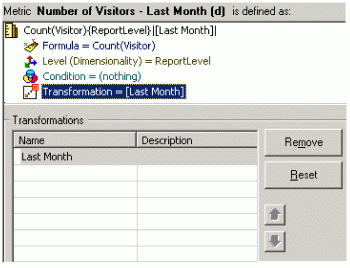
Use the Object Browser on the left side of the Metric Editor to select the transformation for the metric. To remove a transformation, select it in the Transformations window and click Remove.
You can add multiple transformations to the same metric. The arrows allow you to reposition the transformations and thereby change the order they are evaluated. To delete all the transformations, click Reset.
Rather than using the Metric Editor to apply a transformation to a single metric, you can use the Advanced Metric Assistant to combine multiple, simple metrics with multiple transformations. This can help reduce the time required to create the transformation metrics for a project, as described in Creating Metrics by Combining Metrics, Filters, and Transformations.