
MicroStrategy ONE
Level Metrics: Modifying the Context of Data Calculations
By default, metrics are evaluated at the level of the attributes on the report; this is called the report level or dimensionality. For example, a revenue metric is set to the report level. When the metric is placed on a report containing Region, the metric calculates regional revenue. You can set the level within the metric, allowing you to specify the attribute(s) to use in the metric calculation, regardless of what is on a report.
Level metrics are useful for determining the contribution of one object to the whole. For example, you need to determine the contribution to revenue and profit of products bought by your top customers. Level metrics allow you to create contribution metrics, as shown in the following report, which can be helpful for marketing and customer service.
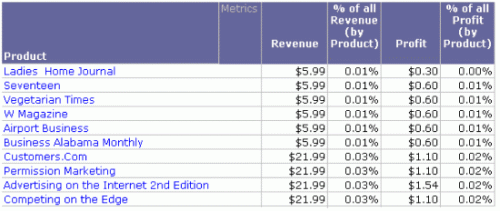
The Revenue and Profit metrics are familiar; they are simply the sum of the Revenue fact or the Profit fact. On the surface, the contribution percentage metrics should be just as easy—product revenue divided by all revenue, or product profit divided by all profit. But how can you calculate at two different levels in the same metric? The answer is a level metric, which allows you to specify how the metric is calculated.
For example, the % of All Revenue (by Product) metric used in the example above divides the Revenue metric by a metric called Revenue (Dimensionality All Products). The Revenue metric is calculated at the report level, in this case, for each product. A different number is calculated for each row of the report. In contrast, the level of the Revenue (Dimensionality All Products) metric has been set to product, which means that it reflects the revenue of all products. The same number is calculated for each row of the report, as shown below.
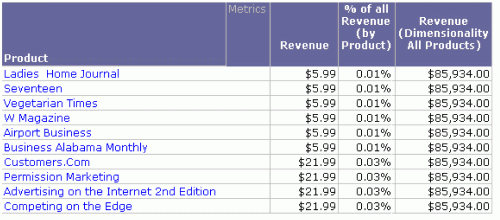
The level is indicated between the curly braces ({ }) in the metric definition shown below:
Sum(Revenue) {~, Product}
The tilde (~) indicates that the report level is still part of the metric level. For information about how the report level provides flexibility and the effects of removing it, see Report Level: Interaction with the Context of Reports.