
Strategy One
Select the Level for Subtotal Calculation in Modern Grids
Starting in Strategy One (November 2025), you can choose the attribute level at which the metric total is calculated in modern grids in dashboards. The subtotal is applied to particular levels, that is, rows and columns. This effectively means "group by attributes to the left of the selected attribute". Each total function can calculate at a different level, providing more flexibility in data analysis within dashboards.
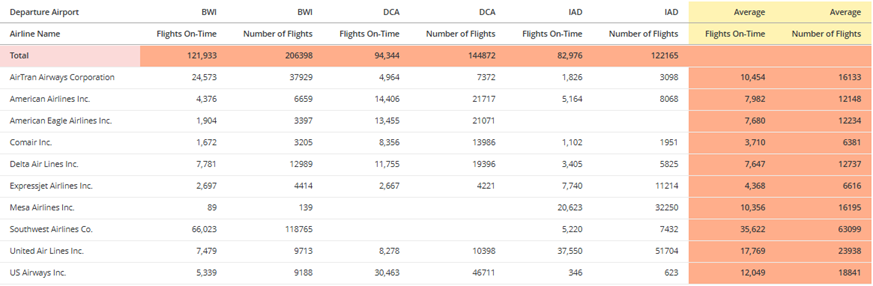
In the modern grid shown below, the metrics are totaled across the airline name, which provides grand totals for each airport-metric combination. The metrics are also averaged across the airports, resulting in averages for each airline-metric combination.
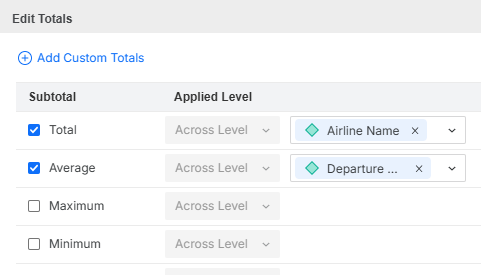
The definition of these subtotals is shown below.
Because this is a modern grid, you can format the subtotal column headers differently from the subtotal row headers. In the example, the subtotal row header (that is, Total) has a rose background, while the subtotal column headers (Average) have a buttermilk yellow background. The subtotal values use a coral background.
Calculate Subtotals Across Levels in Modern Grids
-
While editing the dashboard, click the modern grid to add subtotals to.
-
In the Editor panel or on the grid, right-click an object and select Edit Totals.
-
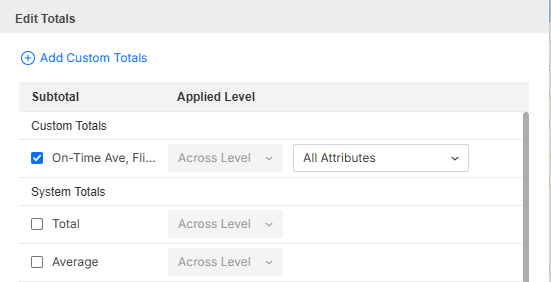
In the Edit Totals window, select the check box for the subtotal function (such as Total or Maximum) or custom subtotal to display.
-
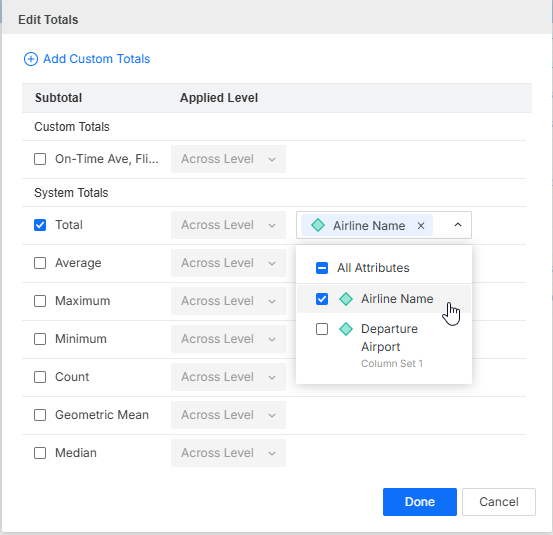
The subtotal is applied across the grid level, that is, across any attributes available on the grid. From the list of attributes on the grid, select the attribute(s) to subtotal.
-
Totals for rows display across the top of the grid.
-
Totals for columns display as a separate column set on the right. (The column set of an attribute displays below the attribute.)
-
-
Click Done.
-
By default, the totals for all metrics display at the top of the grid or modern grid. To move the subtotals to the bottom, right-click the subtotal label in the grid or modern grid, and select Move to Bottom.
- To move the subtotals back to the top, right-click the subtotal label and choose Move to Top.
-
By default, the total for all metrics in a modern grid's columns display in a column set on the right. To move the column set to the left, right-click the subtotal label in the modern grid and select Move to Left. The total column set displays between the attributes in the rows and the first column set.
-
To move the subtotals back to the right, right-click the subtotal label and choose Move to Right.
-