
Strategy ONE
Sorting Structure Elements and Preserving Order
In SAP BW, when you create a characteristic structure and its structure elements, you can re-order the structure elements as required. When characteristic structures are imported into Strategy as attributes, the order of the structure elements in your SAP BW MDX cube source is preserved as the default order of the attribute elements. This maintains a consistent view of your data across your SAP BW MDX cube source and Strategy.
For example, the report shown below includes a Regions attribute mapped to a characteristic structure.
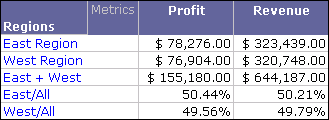
The attribute elements East Region, West Region, East + West, East/All, and West/All are displayed in the same order that is available in the SAP BW MDX cube source. If the order of structure elements has changed in your SAP BW MDX cube source, you can update the MDX cube structure to apply these changes in Strategy (see Updating MDX Cube Structure).
You can also use this structure element order to sort the information on the report. For example, you can perform a descending sort on this structure element order to display the structure elements in the opposite order.
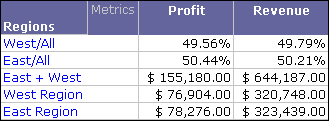
To sort on structure element orders
- In Developer, log in to a project.
- Browse to an MDX cube report, right-click and choose Run.
- Choose Data > Advanced Sorting.
- Choose Rows > Add.
- Choose Sort By, and choose the attribute mapped to the structure.
-
Choose Criteria > Source Order.
Source Order is an attribute form automatically created for the attribute mapped to an SAP BW structure to preserve the structure element order.
- From the Order column, choose Ascending or Descending.
- Click OK.
- Re-execute the report.