
Strategy ONE
View filters versus report limits
View filters and report limits are similar filtering features, as they can both be used to restrict the final result set by setting criteria on the report metrics.
You can define report limits on the value, rank, or percent of the metric value returned. For example, if you set a report limit of Employee Headcount greater than (>) 5 in the Employee Headcount by Region report in the MicroStrategy Tutorial project, the report returns the following results.
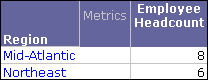
An important aspect of report limits is that they are processed by the SQL Engine after metrics are aggregated. In the report SQL, the report limit definition is included in the Having clause, instead of the Where clause as for the report filter. You can observe this in the report's SQL statement, shown in the image below.
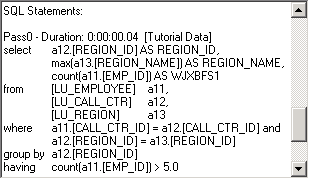
In addition to this functionality, the following features supported for report limits are not supported for view filters:
The table below compares the available features and feature requirements of view filters and report limits:
| Features and Feature Requirements | Available in View Filters | Available in Report Filters |
|
Attribute qualifications |
Yes |
No |
|
Simple metric qualifications |
Yes |
Yes |
|
Can define filtering at report run time by including a prompt in a qualification |
No |
Yes |
|
Can define Break By filtering parameters |
No |
Yes |
|
Evaluated without re-executing SQL and querying the data source |
Yes |
No |
|
Can quickly switch the level at which the qualification is evaluated from report level to the level of attributes displayed on the report |
Yes |
No |
For general information on report limits, see the Basic Reporting Help.
Design considerations
A view filter is similar to a report limit in that it can also be applied at the report level. However, the report limit and the view filter are not interchangeable. A report limit restricts the size of the report data set that is returned from the data warehouse. In contrast, the view filter is applied to the report dataset without altering its size, allowing you to view a subset of that information. A view filter retrieves information quickly because Intelligence Server dynamically accesses the data already in the report results.
Report designers must consider how to balance the memory usage and the processing power between the data warehouse and Intelligence Server. A report limit is more efficient in terms of report data size because it does not return unnecessary information from the data warehouse. Therefore, the report limit can be used to save space on the Intelligence Server memory. However, if a report limit is too restrictive, you may need to frequently redefine the data definition to yield the information users want to see.
On the other hand, a view filter is more flexible, allowing you to refine your analysis after the report is executed. A view filter gives you more control over the subset of data retrieved from the database you want to see. The view filter may be more useful for analysts because it allows analysts to conduct further investigation and refinement of the report results after the report is executed against the data warehouse.