
MicroStrategy ONE
Perform Row Level Math
Consolidations allow mathematical operations between elements or element groups. You can perform arithmetic operations such as addition, multiplication, division, and subtraction. You can even use constants while specifying your elements.
This feature makes consolidations a powerful tool in reporting. It allows you to specify row level math for a report, so that a row in a report is specified by a mathematical operation.
Continuing with the Seasons example, the ratio of sales between different seasons can be calculated using row level math in a consolidation, as shown below:
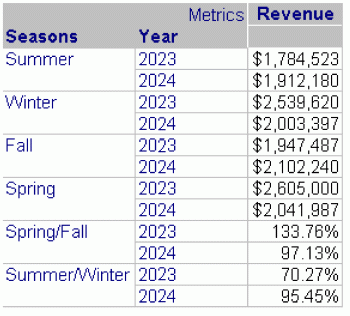
Spring/Fall is the consolidation element Spring divided by the consolidation element Fall. Similarly, Summer/Winter is the consolidation element Summer divided by the consolidation element Winter. The Seasons consolidation performs row level math that makes this report possible. Without consolidations, creating this analysis would be cumbersome.
Notice that elements are formatted as dollars ($) and percentages (%) in the same consolidation. You can format individual consolidation elements in the Consolidation Editor. However, element value formatting cannot be overridden by report formatting. To apply report formatting on element values, element values must be set to the default formatting. For details on the interaction of formatting layers, see Order of Layers.