
Strategy One
Create Planned Tasks
Starting in Strategy One (October 2025), planned tasks are supported in Managed Cloud Government (MCG) environments. To enable this feature in MCG, you must contact Cloud Support or your Technical Account. See Limitations for MCG Environments for important limitations regarding planned tasks in your MCG environment.
Starting in Strategy One (March 2025), you can create a planned task, which schedules the execution of Python scripts in Workstation. Planned tasks function similar to subscriptions, but instead of reports, the content is a Python script, and there is no recipient.
Planned tasks are available in containerized cloud deployments. For information on accessing this feature, contact your Cloud Technical Account Manager.
Prerequisites
-
You must have the following Client - Architect privileges:
-
Administer Planned Tasks: Create, edit, and delete your own planned tasks, as well as deactivate and delete tasks created by others
-
Monitor Planned Tasks: Monitor and view details of planned tasks
-
-
You must also have created a script and a schedule to use with the tasks.
Create a Planned Task
- Open the Workstation window and connect to an environment.
- In the Navigation pane, click
 , next to Planned Tasks.
 - Specify the:
- Content: The Python script to be executed
- Tasks: The name of the task
- Detail: Schedule details and script variable(s) if used in the underlying script
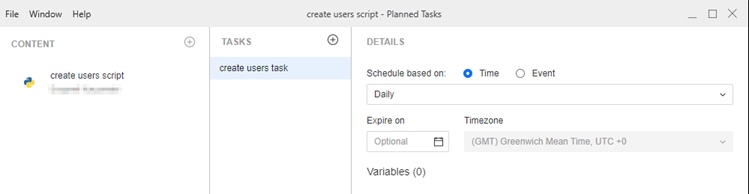
- Click Save.
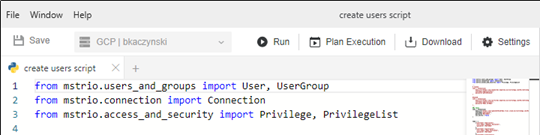
You can also create a planned task in the Script Editor, by clicking Plan Execution.
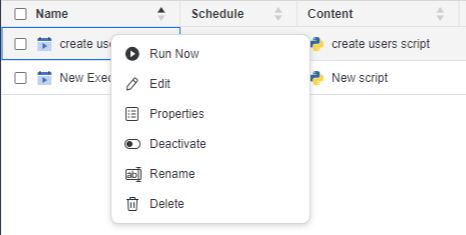
After you create and save the planned task, you can access it from the Planned Tasks window. Right-click the task and select the appropriate option to:
-
Execute the task (Run Now)
-
Edit the task
-
View the task's Properties
-
Activate or Deactivate the task
-
Rename the task
-
Delete the task
You must be the owner the planned task to execute (run) or edit it.
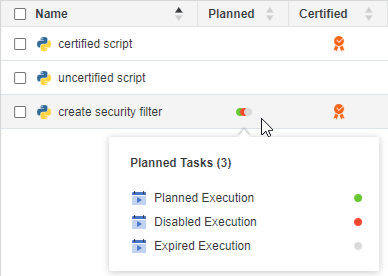
In the Scripts window, a Planned column displays. Right-click in the Planned column of a script to view a list of planned tasks associated with the script and their status, as shown below:
Limitations for MCG Environments
-
Only default Python runtimes are supported.
-
Custom runtimes or installing additional Python libraries (for example, from PyPl) are not allowed, as unrestricted external access is prohibited under FedRAMP guidelines.
-
Feature enablement is reviewed and applied per environment to ensure compliance.