
Strategy One
Monitor Database Instance Connections
Starting in Strategy One (February 2026), you can view database connection details.
A warehouse database connection is initiated anytime a user executes an uncached report or browses uncached elements. The Database Connection Monitor allows administrators to view the number of busy and cached connections to the data warehouse. Administrators can also view the name of the database instance, the user who is using the connection, and the database login being used to connect to the database.
If a database connection is cached, the ODBC connection from Intelligence Server to the data warehouse remains open. However, if the data warehouse connection surpasses the connection time-out or lifetime governors (set on the Advanced tab of the Database Connections dialog in MicroStrategy Developer), the ODBC connection closes and it no longer appears in Database Connection Monitor.
You must have the Monitor Database Connections and Monitor Cluster privileges.
- Open the Workstation window with the Navigation pane in smart mode.
- In the Navigation pane, click Monitors.
- Select an Environment from the upper-left drop-down list.
-
In the left panel, click Database Connections
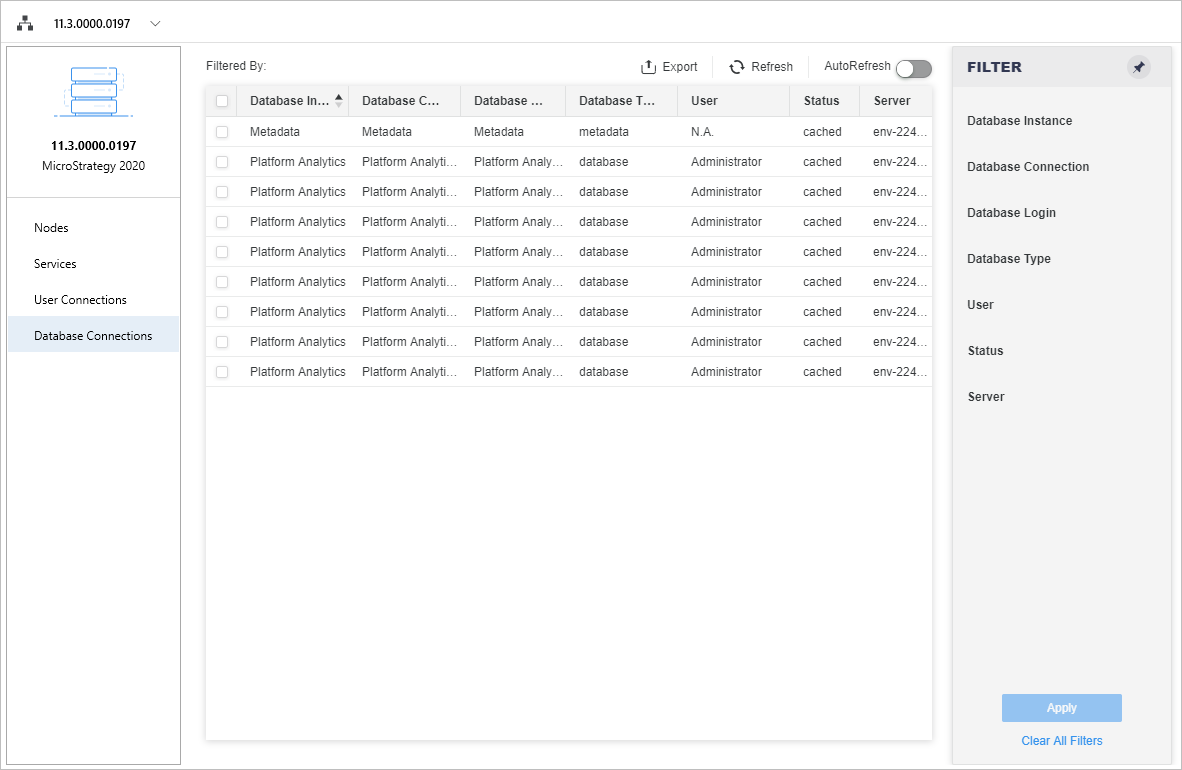 Click here to view details about the Database Connection Monitor.
Filter Panel Lists all the fields shown in the database connection grid. You can make multiple selections and apply the filter to the database connection grid. The filter summary appears at the top of the database connection monitor and you can remove elements or clear all filter selections from there.
Database Connection Grid Lists database connection details, including the database instance, database connection, database login, database type, user, status, and server. For database connections to the metadata, the database instance, database connection, database login columns are filled with metadata.
-
To disconnect a single session, right-click it and choose Disconnect. To disconnect multiple sessions, first select them using the check boxes. You must have the Administer Database Connection privilege to disconnect sessions.
-
The Database Details dialog displays with information such as connection ID, database instance, database connection, database login, database type, user, status, and server.
- Click Export to save the database connection information to a .csv file. This file includes the database connections and the applied filter.
- Enable Autofresh to refresh the database connections every thirty seconds.