
MicroStrategy ONE
Keeping or removing the drilled-from attribute in the new report
When you drill on a report, you can have the drilled-from attribute and its related data displayed in the resulting report, or you can choose to not display the drilled-from attribute on the resulting report. The following examples show the results of both of these options.
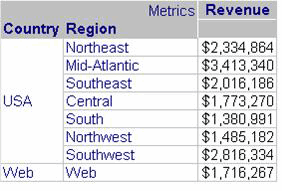
For example, a report contains Country, Region, and the Revenue metric, as shown below:
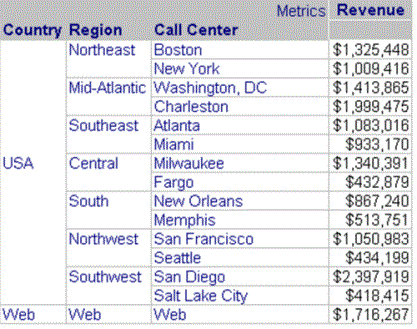
You drill down from Region to Call Center. To do this, you right-click on Region, select Drill, select Down, and select Call Center. If you specify that the drilled-from attribute (called the parent attribute) is kept on the drilled-to report, Region (the drilled-from attribute) appears on the drilled-to report along with Call Center (the drilled-to attribute), as shown below:
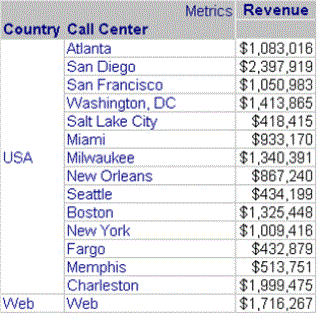
If you specify that the drilled-from attribute is not kept, when you drill down from Region to Call Center, Call Center replaces Region on the drilled-to report as shown below:
Keeping the drilled-from attribute can be helpful to trace your drilling path. However, resulting reports can become very wide if you have many attributes and metrics. Not keeping the drilled-from attribute can help reduce the width of drilled-to reports.
The default behavior is to keep the drilled-from attribute on the drilled-to report. Be aware that the report's designer may have changed the default.
You can change this option for an entire report using MicroStrategy Developer, as described in the procedure below. In MicroStrategy Web or Developer, you can specify whether to keep or remove the drilled-from attribute while you are drilling, for that specific drill action. For steps, see Methods for drilling on a report.
To keep or remove the drilled-from attribute when drilling
- Open a grid report in Developer.
- From the Data menu, select Report Data Options.
- Expand General in the list of categories, then select Drilling.
-
Select one of the following options from the Keep Parent While Drilling drop-down list:
- To ensure the drilled-from attribute appears on the drilled-to report, select Yes.
- To ensure the drilled-from attribute does not appear on the drilled-to report, select No.
- Click OK.