
Strategy ONE
View filter effects on derived elements
View filters restrict data on reports by enabling users to create qualifications on attributes and metrics. These qualifications then determine what data is shown on the report, as well as what data is available to analyze and format with derived elements.
Derived elements cannot be selected in a view filter, and therefore cannot be a part of a view filter qualification that restricts the report results. View filters can only include qualifications on attributes and metrics.
However, derived elements are associated with attribute elements. Due to this association, any view filter qualifications that restrict the data for a derived element's associated attribute elements also restricts data returned for the derived element.
For example, a report includes a Group derived element defined to combine profit values for the Music and Movies elements of the Category attribute. This report is shown below.
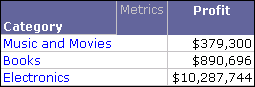
The Music and Movies derived element combines the profit values for the Music attribute element and Movies attribute element. You then create a view filter qualification that restricts the report data to the individual Movies attribute element and Electronics attribute element. The report results are shown below.
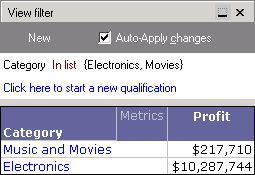
Notice that the Music and Movies derived element is still displayed, but the profit value has decreased. This is because the view filter has restricted the data to only Movies and Electronics. The Music and Movies derived element can only return profit values for the available Movies attribute element data. When using view filters and derived elements on the same report, be aware that any view filter qualifications restrict the data available to analyze and format with derived elements.