
Strategy ONE
Derived elements in Report Services documents with multiple datasets
A Report Services document may contain multiple datasets. The dataset reports that you use may contain derived elements on the same attribute. If the attribute is added to a Grid/Graph in the document, derived elements from all reports are displayed on the Grid/Graph, as well as any elements that are not part of the derived elements, as described in the example below.
Example: derived elements in documents with multiple datasets
A document uses two reports as datasets, defined as follows:
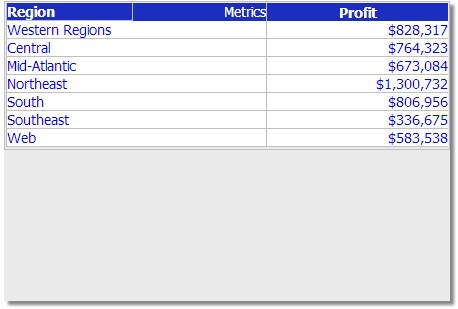
- Dataset 1 is a Regional Profit report, containing the Region attribute and the Profit metric. The derived element Western Regions is defined on Region, with the following elements:
- Northwest
- Southwest
The dataset is shown in the image below.
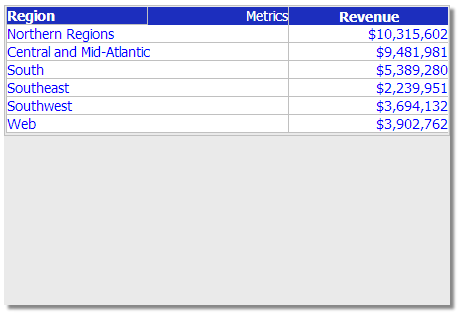
- Dataset 2 is a Regional Revenue report, containing the Region attribute and the Revenue metric. The following derived elements are defined on Region:
- Northern Regions, containing the Northwest and Northeast elements.
Central and Mid-Atlantic, containing the Central and Mid-Atlantic elements.
The dataset is shown in the image below.
In the document, a Grid/Graph is created, and the following objects are added to it:
- Region
- Profit
- Revenue
When the document is executed, the data from both datasets is combined, and derived elements from both datasets are displayed on the combined Grid/Graph, as shown in the image below:
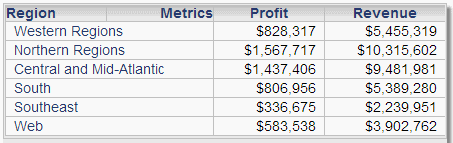
For attribute elements that are not part of a derived element, such as South and Southeast, data from both datasets is combined and displayed.
If your datasets contain derived elements with the same name, and containing the same attribute elements, the data for the derived elements is combined and displayed in a single row.
For detailed instructions to use documents with multiple datasets, refer to the Document Creation Help.