
MicroStrategy ONE
儲存庫管理
- 視窗
- Linux
以下資料庫管理任務由資料庫管理工具執行:
- 按指定頻率或按需備份
- 從先前取得的備份檔案還原特定資料庫
- 從先前備份的檔案中還原所有資料庫
設定檔
DBAdminConfig.yaml 是一個設定文件,用於設定資料庫連線、備份位置和資料庫管理任務頻率。
預設位置為 DBAdminConfig.yaml 是:
C:\Program Files (x86)\Common Files\MicroStrategy\存儲庫\存儲庫管理\conf
---
pgHost: localhost
pgDbNames:
  - platform_analytics_wh
  - mstr_collab
pgUser: mstr
pgPasswd: sest+9y+e6OdXIXTHjgPoC7osqE0rGMzgjR1zA==,kc7GbAQ8pv5yt32L
pgPort: 5432
pgSSLcert: ~
pgSSLkey: ~
pgSSLrootcert: ~
pgSSLmode: prefer
pgBackupLocation: C:\Program Files (x86)\Common Files\MicroStrategy\Repository\pgsql\PGDATA
pgMaxAllowedBackupCount: 5
scheduledConfiguration:
   startDate: 1993-11-12
   backupFrequencyInDays: 2
   localTimeOfExecution: 23:00
   localTimeOfStatsCollection: 00:30
應可存取以下文件:
- pg_dump
- pg_恢復
資料庫管理工具
若要啟動資料庫管理工具:
-
開啟命令提示字元並導航至儲存庫管理 bin 資料夾:
C:\Program Files (x86)\Common Files\MicroStrategy\儲存庫\儲存庫管理\bin
-
運行檔案 mstr-repo-ondemand-dba-操作.bat。
這將打開 DBAOperations 實用程式:
複製****** DBA Tools ******
Enter choice
1) Backup
2) Restore
3) Vacuum
0) Exit
每次操作後該實用程式都會退出。
備份
選擇備份選項 (1) 將列出以下位置的所有資料庫 DBAdminConfig.yaml 文件以及備份所有資料庫和退出實用程式的選項。
User selected: 1 (backup)
Select the database you want to backup.
1) platform_analytics_wh
2) mstr_collab
3) Backup all databases.
0) Exit資料庫將備份在預設備份目錄中的各個資料夾中:
- ..\儲存庫\pgsql\PGDATA\platform_analytics_wh
- ..\儲存庫\pgsql\PGDATA\mstr_collab
該實用程式將計算以下內容:
- 資料庫大小
- 預計備份大小
- 磁碟上的可用空間
(platform_analytics_wh) Database Size: 44.9 MiB
(platform_analytics_wh) Estimated backup size: 4.0 MiB
(platform_analytics_wh) Available Free Space : 12.3 GiB
Backing up database: platform_analytics_wh(platform_analytics_wh) Backup File Created: backup_platform_analytics_wh_20191010.sql
(platform_analytics_wh) Backup File Size: 1.5 MiB
*** Finished backup operation on database: platform_analytics_wh ***如果備份已在給定日期的時間戳記完成,則該實用程式將詢問使用者是否要覆蓋現有備份。
(platform_analytics_wh) Database Size: 44.9 MiB
(platform_analytics_wh) Estimated backup size: 4.0 MiB
(platform_analytics_wh) Available Free Space : 12.3 GiB
(platform_analytics_wh) Backup already done today. Date : 20190930
Overwrite File ? (y/n)
y
(platform_analytics_wh) Overwriting existing backup: backup_platform_analytics_wh_20190930.sql
Backing up database: platform_analytics_wh(platform_analytics_wh) Backup File Created: backup_platform_analytics_wh_20191010.sql
(platform_analytics_wh) Backup File Size: 1.5 MiB
*** Finished backup operation on database: platform_analytics_wh ***恢復
確保連接到要復原的資料庫的所有應用程式都已停止。例如,如果您想恢復 平台_分析_wh,您必須先停止 Platform Analytics Consumer,然後才能選擇並執行「還原」中的步驟。
選擇主選單上的「恢復」選項 (2) 將顯示警告,表示該操作將覆蓋現有資料。但是,該實用程式將在恢復之前進行備份,以確保不會遺失資料。
****** DBA Tools ******
Enter choice
1) Backup
2) Restore
3) Vacuum
0) Exit
2
User selected: 2 (restore)
*** This operation WILL DELETE ALL EXISTING DATA and overwrite the database with backup data. Changes CAN NOT be undone later. ***
Do you want to continue? (y/n)選擇“是”將使該實用程式向前移動並列出所有可以恢復的資料庫以及恢復所有內容的選項。如果選擇全部恢復,則會使用最新的備份檔案還原所有資料庫。
*** This operation WILL DELETE ALL EXISTING DATA and overwrite the database with backup data. Changes CAN NOT be undone later. ***
Do you want to continue? (y/n)
y
Select the database you want to restore.
1) platform_analytics_wh
2) mstr_collab
3) Restore all databases.
0) Exit
選擇給定的資料庫將使實用程式向前移動並顯示復原選項。第一個選項將使用最新的備份檔案備份所選資料庫。第二個選項允許選擇自訂備份。
如果選擇從最新備份恢復,則該實用程式將在預設目錄中找到最新的備份文件,列印文件名,恢復資料庫,並在該目錄中建立恢復前備份,以確保資料不會遺失。
Select restore file
1) Restore from Latest Backup
2) Restore from Custom Backup
0) Exit
1
Restoring latest backup
Searching for backup files in C:\Program Files (x86)\Common
Files\MicroStrategy\Repository\pgsql\PGDATA\platform_analytics_wh
Latest backup file found: backup_platform_analytics_wh_20190930.sql
Starting restore process
*** Restoring database : platform_analytics_wh
如果選擇“從自訂備份還原”,則實用程式會列印預設備份位置的路徑,並詢問使用者是否要在該路徑中搜尋備份。然後,使用者可以選擇該路徑或輸入自訂路徑。輸入檔案路徑後,使用者需要輸入恢復檔案名稱。該實用程式將搜尋該文件,如果找到該文件則開始恢復。
Select restore file
1) Restore from Latest Backup
2) Restore from Custom Backup
0) Exit
2
Restoring custom backup
Default backup path : C:\Program Files (x86)\Common Files\MicroStrategy\Repository\pgsql\PGDATA\platform_analytics_wh
Use default backup path ? (y/n)
y
Enter file name to restore. Press x to cancel.
backup_platform_analytics_wh_20190930
File 'backup_platform_analytics_wh_20190930.sql' found.
Restoring file backup_platform_analytics_wh_20190930.sql.
*** Restoring database : platform_analytics_wh
吸塵
每當更新或刪除 PostgreSQL 表中的行時,都會留下死行。真空可以清除它們,從而可以重複利用空間。如果表沒有被清理,它將變得臃腫,這會浪費磁碟空間並減慢順序表掃描的速度。
如果選擇 Vacuum 選項 (3),則該實用程式將計算所有資料庫的膨脹並向使用者產生報告。
Table Name                                        | Bloat Percent        | Wasted KBs
lu_minute                                         | 2.0                  | 65536
etl_lu_status_category                            | 1.0                  | 24576
etl_rel_action_tran_type                          | 1.3                  | 8192
lu_action_type                                    | 2.0                  | 8192
lu_date                                           | 1.1                  | 8192
lu_privilege                                      | 1.5                  | 8192
lu_session_source                                 | 1.0                  | 0
lu_sql_pass_type                                  | 1.0                  | 0
lu_week                                           | 1.0                  | 0
rel_date_timeperiod                               | 1.0                  | 0
rel_date_weektime_window                          | 0.0                  | 0
etl_rel_source_sub_type_object_type               | 1.0                  | 0
lu_db_type                                        | 1.0                  | 0
lu_db_version                                     | 1.0                  | 0
lu_object_type                                    | 1.0                  | 0
lu_product                                        | 1.0                  | 0
** Bloat report for database: mstr_collab **
Table Name                                        | Bloat Percent        | Wasted KBs
Select the database you want to vacuum.
1) platform_analytics_wh
2) mstr_collab
3) vacuum all databases
4) Full vacuum all databases.
0) Exit
您可以選擇清理單一資料庫、清理所有資料庫或完全清理所有資料庫。
表演時 真空,死空間被回收並可供同一物件、表格等重複使用。
完全清理所有資料庫 將表的全部內容寫入新的磁碟文件,並將浪費的空間釋放回作業系統。這會導致表上的表級鎖定並降低速度。完全清理所有資料庫 應避免在高負載系統上使用。在對所有資料庫執行完全清理之前,您必須停止 Platform Analytics Consumer。
*** Vacuum ***
Select vacuum type
1) Vacuum Bloated Tables
2) Vacuum All Tables
3) Full Vacuum (Blocks DB)
0) Exit
1
Starting Vacuum on tables in list
Vacuuming table : lu_minute with 65536 wasted space
Vacuuming table : etl_lu_status_category with 24576 wasted space
Vacuuming table : etl_rel_action_tran_type with 8192 wasted space
Vacuuming table : lu_action_type with 8192 wasted space
Vacuuming table : lu_date with 8192 wasted space
Vacuuming table : lu_privilege with 8192 wasted space
Vacuuming table : lu_session_source with 0 wasted space
Vacuuming table : lu_sql_pass_type with 0 wasted space
Vacuuming table : lu_week with 0 wasted space
Vacuuming table : rel_date_timeperiod with 0 wasted space
Vacuuming table : rel_date_weektime_window with 0 wasted space
Vacuuming table : etl_rel_source_sub_type_object_type with 0 wasted space
Vacuuming table : lu_db_type with 0 wasted space
Vacuuming table : lu_db_version with 0 wasted space
Vacuuming table : lu_object_type with 0 wasted space
Vacuuming table : lu_product with 0 wasted space
資料庫容量規劃
MicroStrategy ONE 還包括一個監控工具 MicroStrategy 儲存庫。配置設定請參考 設定檔 上面的部分。
觸發統計收集
安裝後預設開啟容量規劃統計資料收集。該服務由一個批次文件控制,該文件接受 開始 |停止|重啟|地位 作為參數。
-
從命令提示字元處,前往:
C:\Program Files (x86)\Common Files\MicroStrategy\儲存庫\儲存庫管理\bin
-
使用適用的參數呼叫以下批次檔:
.\mstr-repo-dba-operations.bat 啟動 |停止|重啟|地位
若要變更統計收集時間,請參閱 KB483944。
監控資料庫狀態
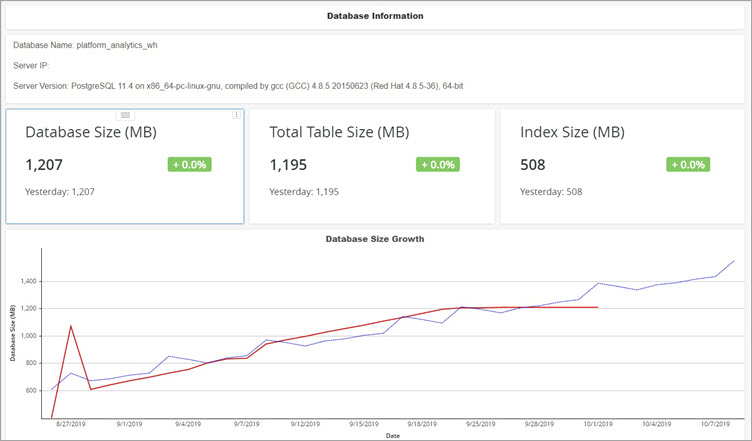
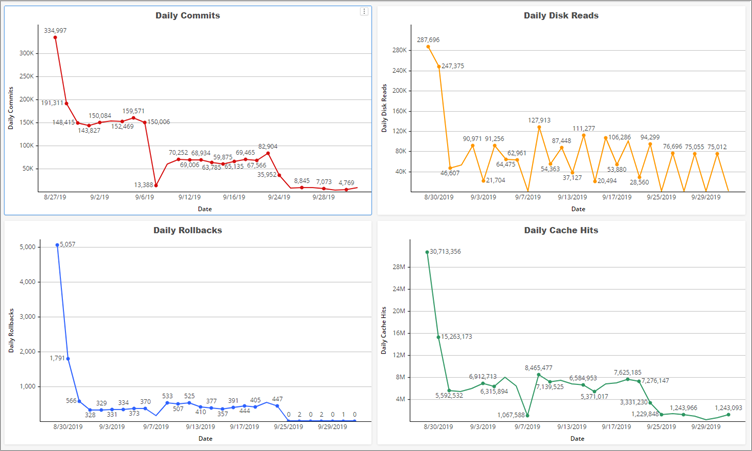
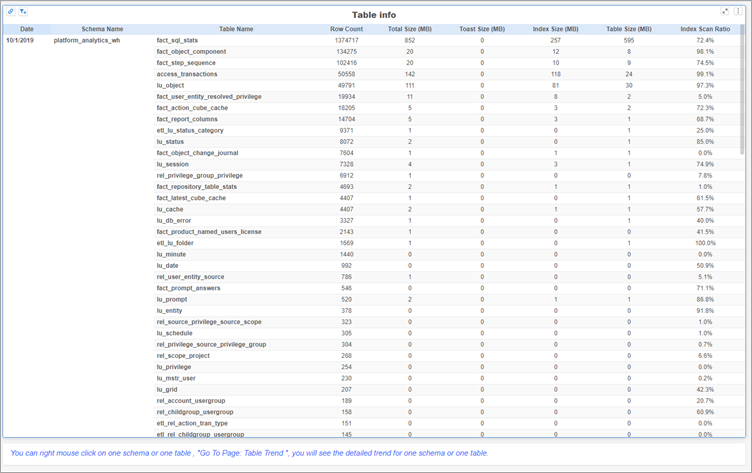
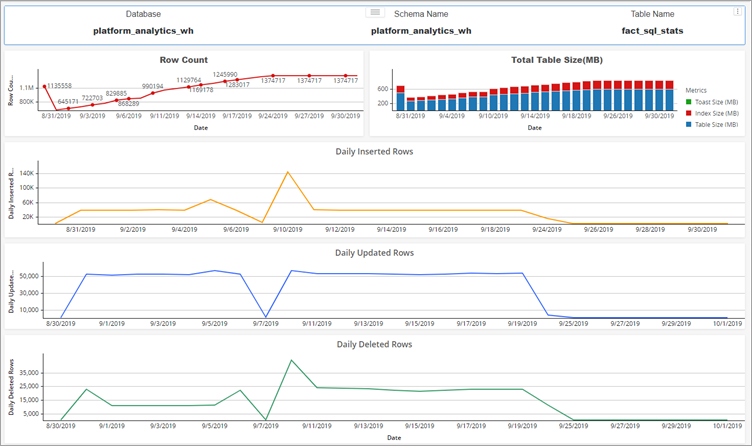
Platform Analytics 專案包含資料庫容量規劃儀表板,用於監控 MicroStratey Repository 的狀態。
-
概覽頁面:
概述將提供有關資料庫的一些基本信息,包括資料庫名稱、IP、資料庫版本以及資料庫大小增長的趨勢。
-
交易頁面:
如果資料庫提交、回滾、磁碟讀取、快取命中,事務將給出每日趨勢。
-
表概覽頁面:
對於表級信息,表概覽將顯示所選資料庫中每個表的統計資料。右鍵單擊列出的架構或表,然後單擊 轉到頁面:表趨勢 取得該表或模式的詳細資料。
-
表趨勢頁面:
以下資料庫管理任務由資料庫管理工具執行:
- 按指定頻率或按需備份
- 從先前取得的備份檔案還原特定資料庫
- 從先前備份的檔案中還原所有資料庫
DBAdminConfig.yaml 是一個設定文件,用於設定資料庫連線、備份位置和資料庫管理任務頻率。
預設位置為 DBAdminConfig.yaml 是:
/選擇/MicroStrategy/儲存庫/儲存庫管理/conf
---
pgHost: localhost
pgDbNames:
  - platform_analytics_wh
  - mstr_collab
pgUser: mstr
pgPasswd: sest+9y+e6OdXIXTHjgPoC7osqE0rGMzgjR1zA==,kc7GbAQ8pv5yt32L
pgPort: 5432
pgSSLcert: ~
pgSSLkey: ~
pgSSLrootcert: ~
pgSSLmode: prefer
pgBackupLocation: /opt/MicroStrategy/Repository/repository-administration/backups/
pgMaxAllowedBackupCount: 5
scheduledConfiguration:
   startDate: 1993-11-12
   backupFrequencyInDays: 2
   localTimeOfExecution: 23:00
localTimeOfStatsCollection: 00:30資料庫管理工具
若要啟動資料庫管理工具:
-
打開終端機視窗並導航到儲存庫管理/bin 資料夾:
/選擇/MicroStrategy/儲存庫/儲存庫管理/bin
-
跑步 ./mstr-repo-ondemand-dba-operations.sh。
這將打開 DBAOperations 實用程式:
複製****** DBA Tools ******
Enter choice
1) Backup
2) Restore
3) Vacuum
0) Exit
每次操作後該實用程式都會退出。
備份
選擇備份選項 (1) 將列出來自 DBAdminConfig.yaml 文件以及備份所有資料庫並退出實用程式的選項。
User selected: 1 (Backup)
Select the database you want to backup.
1) platform_analytics_wh2) mstr_collab
3) Backup all databases.
0) Exit資料庫將備份在預設備份目錄中的各個資料夾中:
- /選擇/MicroStrategy/儲存庫/儲存庫管理/備份/platform_analytics_wh
- /選擇/MicroStrategy/儲存庫/儲存庫管理/備份/mstr_collab
該實用程式將計算以下內容:
- 資料庫大小
- 預計備份大小
- 磁碟上的可用空間
(platform_analytics_wh) Database Size: 44.9 MiB
(platform_analytics_wh) Estimated backup size: 4.0 MiB
platform_analytics_wh) Available Free Space : 12.3 GiB
Backing up database: platform_analytics_wh
(platform_analytics_wh) Backup File Created: backupplatform_analytics_wh_20191010.sql
(platform_analytics_wh) Backup File Size: 1.5 MiB
*** Finished backup operation on database: platform_analytics_wh ***如果備份已在給定日期的時間戳記完成,它會詢問您是否要覆蓋現有備份。
(platform_analytics_wh) Database Size: 44.9 MiB
(platform_analytics_wh) Estimated backup size: 4.0 MiB
(platform_analytics_wh) Available Free Space : 12.3 GiB
(platform_analytics_wh) Backup already done today.
Date : 20190930
Overwrite File ? (y/n)
y
(platform_analytics_wh) Overwriting existing backup: backup_platform_analytics_wh_20190930.sql
Backing up database: platform_analytics_wh
(platform_analytics_wh) Backup File Created:
backup_platform_analytics_wh_20191010.sql
(platform_analytics_wh) Backup File Size: 1.5 MiB
*** Finished backup operation on database: platform_analytics_wh ***恢復
確保連接到要復原的資料庫的所有應用程式都已停止。例如,如果您想恢復 平台_分析_wh,您必須先停止 Platform Analytics Consumer,然後才能選擇並執行「還原」中的步驟。
選擇主選單上的恢復選項 (2) 將顯示警告,表示該操作將覆蓋現有資料。但是,該實用程式將在恢復之前進行備份,以確保不會遺失資料。
User selected: 2 (restore)
Select the database you want to restore.
1) platform_analytics_wh
2) mstr_collab
3) Restoreall databases.
0) Exit
2
User selected: 2 (restore)
*** This operation WILL DELETE ALL EXISTING DATA and overwrite the database with backup data. Changes CAN NOT be undone later. ***
Do you want to continue? (y/n)選擇“是”將使該實用程式向前移動並列出所有可以恢復的資料庫以及恢復所有內容的選項。選擇全部還原將使用最新的備份檔案還原所有資料庫。
*** This operation WILL DELETE ALL EXISTING DATA and overwrite the database with backup data. Changes CAN NOT be undone later. ***
Do you want to continue? (y/n)
y
Select the database you want to restore.
1) platform_analytics_wh
2) mstr_collab
3) Restore all databases.
0) Exit選擇給定的資料庫將使實用程式向前移動並顯示復原選項。第一個選項可讓您使用最新的備份檔案備份所選資料庫。第二個選項可讓您選擇自訂備份。
如果選擇從最新備份還原,該實用程式將在預設目錄中找到最新的備份文件,列印文件名,還原資料庫,並在該目錄中建立預還原備份以確保資料不會遺失。
Select restore file
1) Restore from Latest Backup
2) Restore from Custom Backup
0) Exit
1
Restoring latest backup
Searching for backup files in /opt/MicroStrategy/Repository/repository-administration/backups/platform_analytics_whStarting restore process
*** Restoring database : platform_analytics_wh如果選擇“從自訂備份還原”,則實用程式會列印預設備份位置的路徑,並詢問您是否要在該路徑中搜尋備份。然後您可以選擇該路徑或輸入自訂路徑。輸入檔案路徑後,輸入恢復檔案名稱。該實用程式將搜尋該文件,如果找到該文件則開始恢復。
Select restore file
1) Restore from Latest Backup
2) Restore from Custom Backup
0) Exit
2
Restoring custom backup
Default backup path : /opt/MicroStrategy/Repository/repository-administration/backups/platform_analytics_wh
Use default backup path ? (y/n)
y
Enter file name to restore. Press x to cancel.
backup_platform_analytics_wh_20190930
File 'backup_platform_analytics_wh_20190930.sql' found.
Restoring file backup_platform_analytics_wh_20190930.sql.
*** Restoring database : platform_analytics_wh吸塵
每當更新或刪除 PostgreSQL 表中的行時,都會留下死行。真空可以清除它們,以便可以重複使用空間。如果表沒有被清理,它將變得臃腫,這會浪費磁碟空間並減慢順序表掃描的速度。
如果選擇 Vacuum 選項 (3),則該實用程式將計算所有資料庫的膨脹並產生報告。
****** DBA Tools ******
Enter choice
1) Backup
2) Restore
3) Vacuum
0) Exit
3
User selected: 3 (vacuum)
*** BLOAT REPORT ***
** Bloat report for database: platform_analytics_wh **
Table Name | Bloat Percent | Wasted KBs
lu_minute | 2.0 | 65536
etl_lu_status_category | 1.0 | 24576
etl_rel_action_tran_type | 1.3 | 8192
lu_action_type | 2.0 | 8192
lu_date | 1.1 | 8192
lu_privilege | 1.5 | 8192
lu_session_source | 1.0 | 0
lu_sql_pass_type | 1.0 | 0
lu_week | 1.0 | 0
rel_date_timeperiod | 1.0 | 0
rel_date_weektime_window | 0.0 | 0
etl_rel_source_sub_type_object_type | 1.0 | 0
lu_db_type | 1.0 | 0
lu_db_version | 1.0 | 0
lu_object_type | 1.0 | 0
lu_product | 1.0 | 0
** Bloat report for database: mstr_collab **
Table Name |
Bloat Percent | Wasted KBs
Select the database you want to vacuum.
1) platform_analytics_wh
2) mstr_collab
3) vacuum all databases.
4) Full vacuum all databases.
0) Exit您可以選擇清理單一資料庫、清理所有資料庫或完全清理所有資料庫。
表演時 真空,死空間被回收並可供同一物件、表格等重複使用。
完全清理所有資料庫 將表的全部內容寫入新的磁碟文件,並將浪費的空間釋放回作業系統。這會導致表上的表級鎖定並降低速度。完全清理所有資料庫 應避免在高負載系統上使用。在對所有資料庫執行完全清理之前,您必須停止 Platform Analytics Consumer。
*** Vacuum ***
Select vacuum type
1) Vacuum Bloated Tables
2) Vacuum All Tables
3) Full Vacuum (Blocks DB)
0) Exit
1
Starting Vacuum on tables in list
Vacuuming table : lu_minute with 65536 wasted space
Vacuuming table : etl_lu_status_category with 24576 wasted space
Vacuuming table : etl_rel_action_tran_type with 8192 wasted space
Vacuuming table : lu_action_type with 8192 wasted space
Vacuuming table : lu_date with 8192 wasted space
Vacuuming table : lu_privilege with 8192 wasted space
Vacuuming table : lu_session_source with 0 wasted space
Vacuuming table : lu_sql_pass_type with 0 wasted space
Vacuuming table : lu_week with 0 wasted space
Vacuuming table : rel_date_timeperiod with 0 wasted space
Vacuuming table : rel_date_weektime_window with 0 wasted space
Vacuuming table : etl_rel_source_sub_type_object_type with 0 wasted space
Vacuuming table : lu_db_type with 0 wasted space
Vacuuming table : lu_db_version with 0 wasted space
Vacuuming table : lu_object_type with 0 wasted space
Vacuuming table : lu_product with 0 wasted space