
MicroStrategy ONE
Enabling drilling down or drilling anywhere
For a given report, you can enable drilling in all directions or restrict drilling to lower-level attributes in a given hierarchy.
- Drill anywhere: When this option is selected in the procedure below, users can view data associated with the object they drill from, no matter which direction in the attribute's hierarchy they drill. For example:
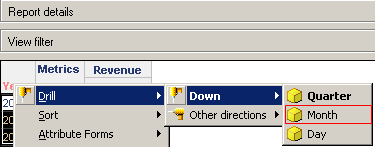
A user can drill down from an attribute to the child attribute data, for example, drilling from Year data down to Month data.
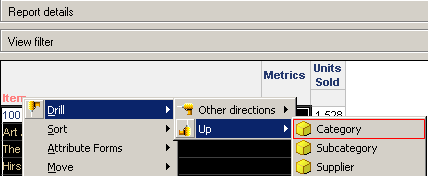
A user can drill up from an attribute to the attribute's parent attribute data, for example, drilling from Item data up to Category data.
- A user can drill across to other, related attributes, for example, drilling from Region data across to Category data.
- Drill down only: When this option is selected in the procedure below, users can only view data associated with objects lower in the hierarchy than the attribute on which they are drilling. For example:
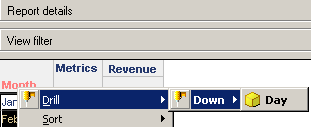
Drilling down from the Month attribute or one of its elements, users can only drill to Day.
- Drilling down from the Category attribute or one of its elements, users can only drill to Subcategory and Item.
For background information on drilling and how to drill on a report, see Hierarchies.
To enable drilling in Developer
- Open a grid report.
- From the Data menu, select Report Data Options.
- Expand General in the list of categories, then select Drilling.
- If it is not already selected, select the Enable Report Drilling check box.
-
Select one of the following options:
- Drill anywhere: Users can view data associated with the object they drill from, no matter which direction in the attribute's hierarchy they drill: up, down, or across. Examples are provided above.
- Drill down only: Users can only view data associated with objects lower in the hierarchy than the attribute on which they are drilling. Examples are provided above.
- Click OK.
To enable drilling in MicroStrategy Web
- Open a grid report.
- From the Tools menu, select Report Options.
-
On the General tab, select one of the following options:
- Drill anywhere: Users can view data associated with the object they drill from, no matter which direction in the attribute's hierarchy they drill: up, down, or across. Examples are provided above.
- Drill down only: Users can only view data associated with objects lower in the hierarchy than the attribute on which they are drilling. Examples are provided above.
- Click OK.