
Strategy ONE
Filter derived element
A Filter derived element uses a filter qualification to determine the combination of attribute elements for a derived element.
For example, in a report with Region and Category attributes and a Profit metric, you can filter the regions on the report into various geographical groups based on the region names.
The report shown below includes the following derived elements defined using filters for Region attribute elements:
- Southern Regions: Returns attribute elements whose name begins with South.
- Northern Regions: Returns attribute elements whose name begins with North.
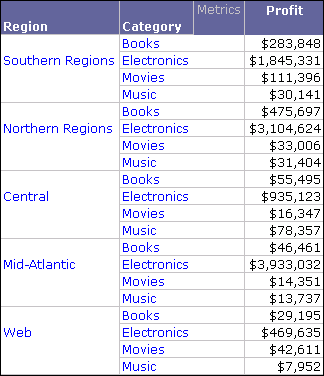
A procedure to create the report shown above is provided in Filtering attribute elements to create a derived element.
Filter derived elements are created by filtering attribute elements to include in each derived element. There are two methods to create Filter derived elements:
- Create a Filter derived element using a filter qualification on a list of attribute elements. This includes using the In list and Not in List operators.
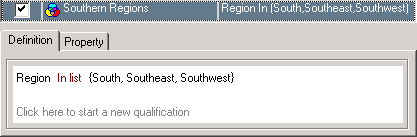
In list: A filter qualification using In list returns data for all the attribute elements you select. An In list filter qualification that returns all the southern regions is shown below.
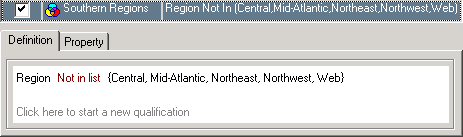
Not in List: A filter qualification using Not in List returns data for all the attribute elements you do not select, for a given attribute. A Not in List filter qualification that returns all the southern regions is shown below.
-
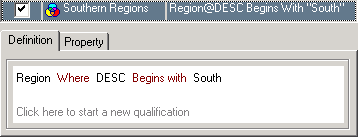
Create a Filter derived element using a filter qualification on attribute forms. This enables you to use various logical and mathematical operators to create filter qualifications on attribute forms to return data. An attribute form qualification using a Begins with operator that returns all southern regions is shown below.
You can use any of the following operators in attribute form qualifications, which are described in detail in Appendix A, Logical and Mathematical Operators for Filtering in the Advanced Reporting Help:
|
Operator Type |
Operator |
|
Comparison Operators Comparison operators compare values. The values can be numbers, text strings, or expressions. |
Exactly |
|
Different from |
|
|
Greater than |
|
|
Less than |
|
|
Greater than or equal to |
|
|
Less than or equal to |
|
|
Between |
|
|
Pattern Operators Pattern operators allow text strings to be compared. Pattern operators are case-sensitive. |
Like |
|
Not Like |
|
|
Contains |
|
|
Does not contain |
|
|
Begins with |
|
|
Does not begin with |
|
|
Ends with |
|
|
Does not end with |
To create Filter derived elements, you must use the Derived Elements Editor (see Using the Derived Elements Editor).