
Strategy ONE
Derived element interactions with derived metrics
Most derived metrics are represented correctly when used with derived elements. However, some derived metrics can be calculated incorrectly when using derived elements, due to the order in which derived elements and derived metrics are calculated.
For example, a derived metric that uses a division, such as Profit/Revenue, is calculated incorrectly when using derived elements. This is because, by default, derived metrics are evaluated before derived elements. You must change the evaluation order to evaluate derived elements before this type of derived metric.
For example, the report shown below includes the Region attribute with East Coast, West Coast, and Central and South derived elements defined on it. The metrics are Revenue, Profit, and Profit Margin.
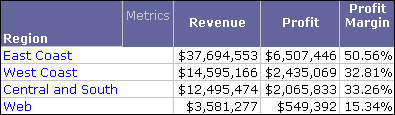
Profit Margin is a derived metric, with the definition Profit/Revenue. Notice that the values for Profit Margin are much higher than they should be for the derived elements, but the value for the Web attribute element is correct. This is because Profit Margin is calculated for the individual attribute elements, before the attribute elements are combined to display the derived elements.
By evaluating the derived elements before the Profit Margin derived metric, the correct Profit Margin values are displayed for all derived elements and attribute elements.
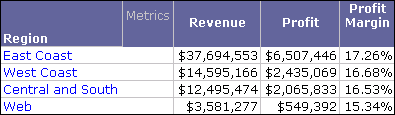
To modify the evaluation order of derived elements in reports
- In Developer, log in to a project that includes a report with derived elements and derived metrics.
- Browse to and right-click a report, and select Run. The report is executed in the Report Editor.
- Choose Data > Report Data Options. The Report Data Options dialog box opens.
- Expand the Calculations category, and then select Evaluation Order.
- Clear the Use default evaluation order check box. This displays all objects on the report that can have their evaluation order modified.
-
In the Evaluation Order column, select the evaluation orders for each object in the report.
Objects are evaluated from lowest evaluation order number to highest. However, if you define an object to use Default as its evaluation order, it may be evaluated before an object with an evaluation order of
1.For example, if you define a derived element with an evaluation order of
1and a derived metric with an evaluation order of Default, the derived metric is evaluated first. This is because derived metrics are evaluated before derived elements by default. To evaluate a derived element before a derived metric, define the derived metric to have a higher evaluation order than the derived element. - Click OK. The changes to the evaluation order are displayed in the report. To view the evaluation order of the various objects on the report, display the report in SQL View.
To modify the evaluation order of derived elements in Grid/Graphs in Report Services documents
- In Developer, log in to a project that includes a report with derived elements.
- Browse to and right-click a document, and select Edit. The document opens in the Document Editor.
- Double-click the Grid/Graph that contains the derived element to enter Edit mode.
- Choose Data > Grid Data Options. The Grid Data Options dialog box opens.
- Expand the Calculations category, and then select Evaluation Order.
- Clear the Use default evaluation order check box. This displays all objects on the report that can have their evaluation order modified.
-
In the Evaluation Order column, select the evaluation orders for each object in the report.
Objects are evaluated from lowest evaluation order number to highest. However, if you define an object to use Default as its evaluation order, it may be evaluated before an object with an evaluation order of
1.For example, if you define a derived element with an evaluation order of
1and a derived metric with an evaluation order of Default, the derived metric is evaluated first. This is because derived metrics are evaluated before derived elements by default. To evaluate a derived element before a derived metric, define the derived metric to have a higher evaluation order than the derived element. - Click OK.
- To view the updated Grid/Graph, run the document.