
Version 2021
Metadata Repository
No PostgreSQL specific customizations were made for this feature.
Open database connectivity (ODBC) is required for the metadata repository. The ODBC driver, MicroStrategy ODBC driver for PostgreSQL wire protocol, is certified for the metadata.
The metadata repository is a collection of tables that contain the definitions for nearly all MicroStrategy objects including database logins, server definitions, database instances and connections, reports, metrics, facts, and so on. You can create the metadata repository in the database location of your choice. Additionally, a default configuration is created in the metadata tables. This populates the tables with the basic data required for the MicroStrategy metadata, such as the default project folder structure and some basic connection information.
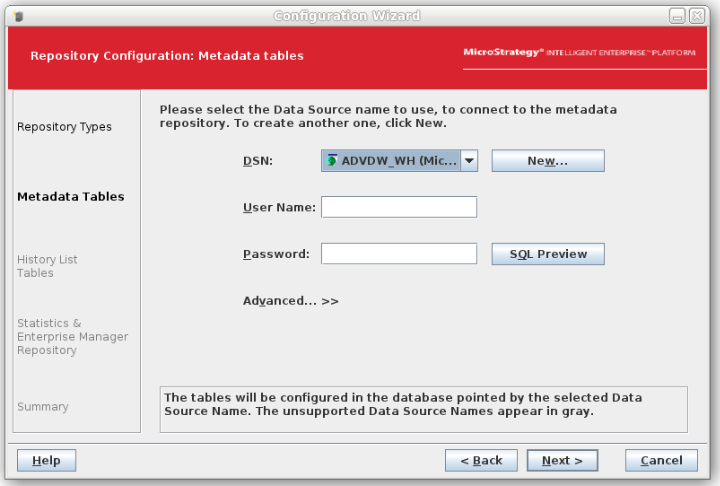
Launch the Configuration wizard and choose to create repositories then select metadata. There is a dialog that includes fields to define how to create your metadata tables and where they should be stored.
-
DSN: Select the data source name for your metadata repository.
-
User Name: Enter the user name for the user that can connect to the data source.
-
Password: Enter the password for the user that can connect to the data source.
-
SQL Preview: After providing a valid user name and password, click SQL Preview to open the SQL Preview dialog box. This dialog box provides the SQL statements that will be executed on your data source to create the metadata tables. Click Close once you are done reviewing the SQL statements to return to the Configuration wizard.
If you use the advanced options to change the SQL script, click SQL Preview after selecting the new script to see an updated listing of the SQL statements to be executed. -
Advanced: Click this option to specify a table prefix and SQL script to create metadata tables.
-
Table Prefix: Enter a prefix for the metadata tables. You must use different prefixes for your metadata tables and your history list tables if you store them in the same database. The following options are available regarding prefix format:
Most databases use a prefix of two characters. However, you can supply as many letters, numbers, underscores (_), and periods (.) as required to support your database prefixes. To determine character limits for a prefix, refer to your third-party database vendor documentation.
-
Script: Select a SQL script to create the metadata tables. The Configuration wizard automatically uses the SQL scripts optimized for your database platform. It is highly recommended that no edits be performed on these scripts, except on rare occasions and only by skilled database personnel.
-