
Version 2021
Parallel Query
Parallel Query Execution is an advanced property that determines whether MicroStrategy attempts to execute multiple queries in parallel to return report results faster and publish Intelligent Cubes.
This VLDB property has the following options:
-
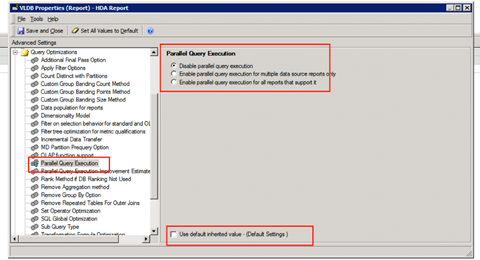
Disable parallel query execution (default): All queries for MicroStrategy reports and Intelligent Cubes are processed sequentially.
-
Enable parallel query execution for multiple data source reports only: MicroStrategy attempts to execute multiple queries in parallel for MicroStrategy reports and Intelligent Cubes that access multiple data sources. For reports and Intelligent Cubes that do not use the multi-source option or database gateway support to access multiple data sources, all queries are processed sequentially.
-
Enable parallel query execution for all reports that support it: MicroStrategy attempts to execute multiple queries in parallel for all MicroStrategy reports and Intelligent Cubes. This option is automatically used for data that you integrate into MicroStrategy using data import.
You can turn on the setting on the report level in the report edit mode.
-
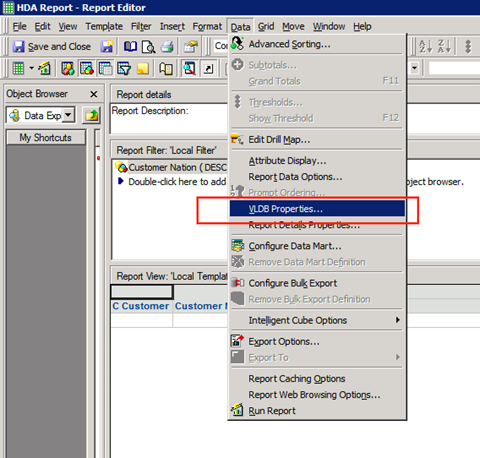
In Developer, choose Data > VLDB Properties.
-
Choose Query Optimization > Parallel Query Execution to turn parallel execution on or off.
See Parallel Query Execution for more information.