
Version 2021
Data Enrichment
No PostgreSQL specific customizations were made for this feature.
Data enrichment aims to improve the quality of the data with other datasets, APIs, or data sources to provide a richer analysis. Take geographic attribute enrichment as an example.
MicroStrategy allows you to enrich your geo location data during the data preparation stage. Select the geographic type of Country, City, or Zip code or create additional attributes to use in map visualizations.
The  icon indicates that your attribute is a geo location attribute. When the dataset is published as an in-memory cube, you can view the attribute forms of your geo location attribute. Notice that the longitude and latitude data are automatically included in your data.
How to Create Geo Location Attributes
Geo Location attributes are only supported for in-memory mode.
- Import data containing geographic information. For example, say you have a City attribute.
- Click Prepare Data.
-
Right-click the City attribute and choose Define Geography.
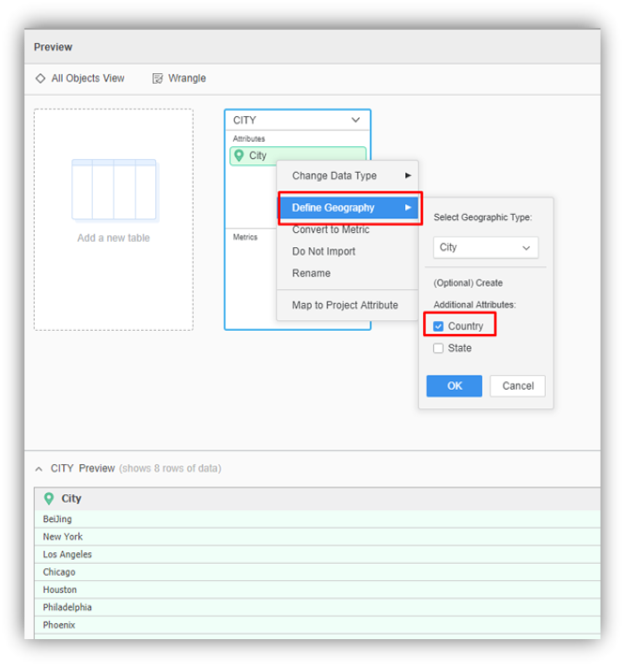
- Use the drop-down to select the geography type and select additional attributes to create additional geo location attributes.
- Click OK and Finish.
- In your dataset, right-click the geo location attribute and select Display Attribute Forms.
- Select ID, Latitude, and Longitude.
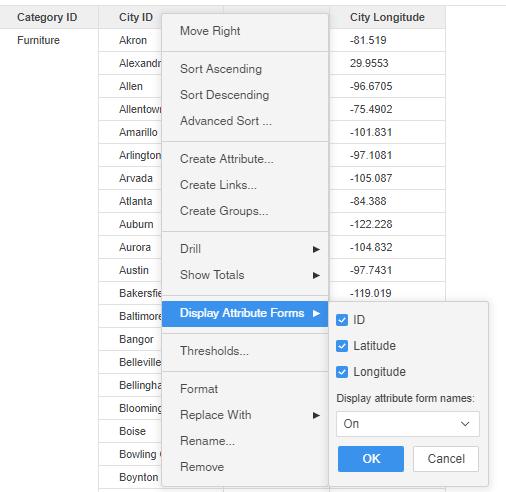
- Click OK.
Geo location data is installed by MicroStrategy. The pre-installed geo attribute data exists in the following locations:
- Windows: <Installation path>\Common Files\MicroStrategy\Zip code.csv
- Linux: <Installation path>/MicroStrategy/install/Country.csv