
MicroStrategy ONE
Viewing data at different levels: drilling
Some MicroStrategy reports and documents allow you to view information at lower, more detailed levels or higher, summarized levels. For example, a report can display time at the year level by default, but can also display data grouped by quarter or month.
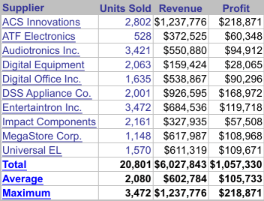
You may be able to change the level at which you are viewing data by tapping an object. In the example above, tapping ACS Innovations displays data for each category of products sold by ACS Innovations.
To go back to the level you were at previously, tap the back arrow in the top left.
If drilling was enabled for a report or document, you can drill from page-bys, attributes, or metrics. Drilling is enabled by the designer. For an introduction to drilling, see the Basic Reporting Guide.