
MicroStrategy ONE
Customizing Error Messages for Mobile Devices
Mobile administrators can customize error messages originating from Intelligence Server. Use this custom error message feature to:
- Provide alternate, less technical, and app-specific text
- Include administrator contact information
- Translate error message text
This feature is for customizing error messages originating from Intelligence Server. The Mobile server performs the following general workflow when an error is received from Intelligence Server:
- The Mobile server verifies whether the error code is configured in the mobileErrors.xml file on the Mobile server. If the error code is configured in the mobileErrors.xml file, the Mobile server passes the customized message to the mobile app. To configure an error code in the mobileErrors.xml file, see To Customize Error Messages for Mobile Devices (from Intelligence Server)
For a list of the out-of-the-box error message defined in the mobileErrors.xml file, see Default MobileErrors.xml.
- If the error code is not configured in the mobileErrors.xml file, the Mobile server verifies whether the Override unhandled Intelligence Server error messages setting is enabled. If the setting is enabled, the Mobile server passes the defined error message to the mobile app. To set the override setting, see To Override Non-Customized Error Messages (from Intelligence Server).
- If the Override unhandled Intelligence Server error messages setting is not enabled, the Mobile server passes the standard error message from the Intelligence Server to the mobile app.
When an error is logged, the original error message from Intelligence Server is always written to the log file, regardless of the error message sent to the mobile app.
To Customize Error Messages for Mobile Devices (from Intelligence Server)
- On the Mobile server, open the mobileErrors.xml file with an XML or text editor.
The file is located in <MobileServerRoot>\WEB-INF\xml\config.
If installed on the C: drive, the file is located in C:\Program Files (x86)\MicroStrategy\Mobile Server ASPx\WEB-INF\xml\config.
- Edit the file to customize error messages.
The following is an typical error message from the XML file:
Copy<error code="-2147216380" displayError="true" showContactInfo="true" target="login" useOriginalMessage="false">
<message XMLmerge_id="1" desc="The page could not be displayed." desc-id="mstrWeb.14784"/>
<message XMLmerge_id="2" desc=" " desc-id=""/>
<message XMLmerge_id="3" desc="Please contact your Administrator." desc-id="mstrWeb.456"/>
</error>Note the following syntax rules:
- Only the following attributes are supported in the
<error/>tag: code- specifies the ID of the error code from Intelligence Server.useOriginalMessage- specifies whether to use the error message from Intelligence Server. Iftrue, the text from Intelligence Server is passed to the Mobile app. Iffalse, the custom text is passed to the Mobile app.Other attributes are available for MicroStrategy Web only and are ignored here.
- If there are multiple <
message/> tags defined for an error code, the messages are concatenated and passed to the mobile app. - When translating error messages, it is good practice to divide the text into strings that can be reused by multiple error messages.
- Internationalization is supported through the
desc-idattributes, which point to the translated strings in the MessagesBundle_*.properties files in <MobileServerRoot>\WEB-INF\classes\resources. For more information see Using Localization Descriptor Files.
- Only the following attributes are supported in the
- Save and close the file.
To Override Non-Customized Error Messages (from Intelligence Server)
- Open Mobile Administrator.
- Click Security. The Security page opens.
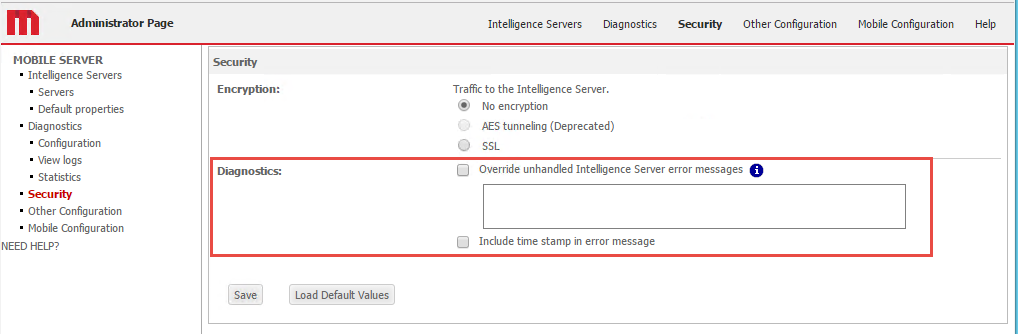
- In the Diagnostics section, note the following options:
- Override unhandled Intelligence Server error messages - Specifies the error message text that will be sent to mobile apps for errors originating from Intelligence Sever and that are not configured in the mobileErrors.xml file on the Mobile server. To define an error message, select the check box and enter the error message text in the text field.
Internationalization of this message is currently not supported.
- Include time stamp in error message - Select the check box to include a time stamp when the error message is sent to the mobile apps.
- Click Save.
Default MobileErrors.xml
The out-of-the-box mobileErrors.xml file includes customizations for the error messages listed in the following table. For other scenarios, mobile administrator can choose to replace the error messages through the Override unhandled Intelligence Server error messages setting on the Security page in Mobile Administrator Security page, or add additional error messages to the mobileErrors.xml file.
| Scenario | Error Code | Customized Error Message |
|---|---|---|
|
User does not have the privilege to use mobile app |
-2147205002 | You do not have the required privilege to access this resource. Please contact your Administrator. |
|
User lacks necessary privileges to access the resource |
-2147213784 | You do not have the required privilege to open the page. Please contact your Administrator. |
| Project LDAP privilege error | -2147214578 | The username or password you entered is incorrect. |
| User is not linked to any MicroStrategy user | -2147212488 | Your account is not linked to a MicroStrategy account. Please contact your Administrator. |
| The size of the result binary exceeds the limit set by the client request | -2147071867 | The size of the result binary exceeds the limit set by the client request. Please contact your Administrator. |
| Dataset cannot be run | -2147466604 | The page could not be displayed because cube is not published or dataset returns an error. Please publish the cube or contact your administrator for help. |
| Username is not found or password is incorrect | -2147216959 | The username or password you entered is incorrect. |
| User is disabled | -2147216965 | Your account has been disabled. Please contact your Administrator. |
| User is required to change the password | -2147216960 | Your password has expired. You will need to change it in order to connect. |
| Password has expired | -2147216963 | Your password has expired. You will need to change it in order to connect. |
| Project is not loaded | -2147209183 | The project is offline now. If the problem persists, please contact your administrator for help. |
| Attempt to access data for project not registered with server | -2147209151 | The project could not be found. Please contact your Administrator. |
| Intelligence Server is not connected | -2147206923 | The contents of this page could not be displayed because the Intelligence Server is not running. Please contact the Administrator. |
| The connection failed | -2147207419 | The contents of this page could not be displayed because the Intelligence Server is not running. Please contact the Administrator. |
| The target report, document, or any object (for example, attribute, metric, etc.) referenced cannot be found in the metadata | -2147216373 | The page could not be displayed. Please contact your Administrator. |
| Standard authentication not allowed | -2147213792 | Standard authentication is not allowed. Please specify a correct authentication mode or contact your administrator for help. |
| Maximum number of Server users exceeded | -2147209056 | Maximum number of Server users exceeded. Please try again. If the problem persists, contact the Administrator. |
| User does not have privilege to log in to the selected project | -2147216961 | Please contact your Administrator. |
| Database connection errors | -2147216380 | The page could not be displayed. Please contact your Administrator. |
| Login failure | -2147216953 | You cannot log in as Windows user. Please contact your Administrator. |
| Unable to determine your Windows identity | -2147205087 | You cannot log in as Windows user. Please contact your Administrator. |
| The user does not have access to this object | -2147214570 | You do not have the required privilege to open the page. Please contact your Administrator. |
| Login failure | -2147072513 | You have reached the maximum number of password attempts. Please contact your Administrator. |
| You cannot supply a new password; the current password is not modifiable | -2147216972 | You are not allowed to change your password. Please contact your Administrator. |
| No server is available to serve your request | -2147205282 | The contents of this page could not be displayed because the Intelligence Server is not running. Please contact the Administrator. |
| Type mismatch | -2147352571 | Error when answering the prompt. Please review your answer(s). |
| The proposed answer to a prompt question failed validation requirements | -2147217090 | Error when answering the prompt. Please review your answer(s). |
| Failed to load object from XML | -2147216992 | Error when answering the prompt. Please review your answer(s). |
| Request timeout | -2147206497 | Your request has timed out. Please try again later. |
| Maximum number of result rows retrieved per report was exceeded | -2147202391 | The page could not be displayed. Please contact your Administrator. |
| Message is not persisted in history list. History list may be full | -2147205473 | The page could not be displayed. Please contact your Administrator. |
| Maximum number of jobs per User Account exceeded when trying to submit job for user in project Id | -2147209053 | You have reached the maximum number of messages per user. Please contact the Administrator. |
| Number of jobs exceeded maximum for Project | -2147209164 | The maximum number of messages per project has been reached. Please contact the Administrator. |
| You do not have access to the object | -2147214579 | You do not have the required privilege to open the page. Please contact your Administrator. |
| Project is idle | -2147209192 | The project is idle now. If the problem persists, please contact your administrator for help. |