
Strategy ONE
Available Drill Paths with MDX Cube Reports
In standard Strategy reports, when you drill on attributes that are part of the relational project schema, drill paths enable you to drill up and down to other attributes that are part of the same hierarchy. The up and down drill paths are based on the system hierarchy. In MDX cube reports, you can drill across from any attribute to any other attribute available in the MDX cube, but up and down drill paths may not be available. The drill paths available in MDX cube reports are determined by whether attributes are mapped directly to characteristics, or whether attributes are mapped to attributes that are part of a hierarchy.
Up and down drill paths for an attribute are only available for attributes mapped to levels of an SAP BW hierarchy. In SAP BW, hierarchies can be created to organize and logically relate a group of characteristic data (represented as attributes in Strategy). When these hierarchies are imported into Strategy, up and down drill paths are created for the hierarchy's attributes.
For example, you create an MDX cube report on an SAP BW MDX cube. The MDX cube includes a Geography hierarchy which organizes the characteristics Country, Region, and Call Center (Geography Level 00, Level 01, and Level 02 respectively). Attributes in Strategy are mapped to the characteristics Country, Region, and Call Center of the MDX cube.
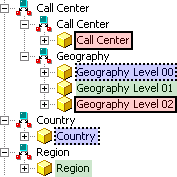
In this example, the attributes of the Geography hierarchy are intentionally not renamed so that the difference between the attributes that are part of the hierarchy and the attributes mapped directly to the characteristics can be observed. You can rename the hierarchy attributes to match the attributes mapped to the characteristics. For example, you can rename the attribute Geography Level 00 as Country.
You then create an MDX cube report that includes the Geography Level 01 attribute of the Geography hierarchy that contains regional data. To drill down to call center data, you can drill down on the Geography Level 01 attribute.
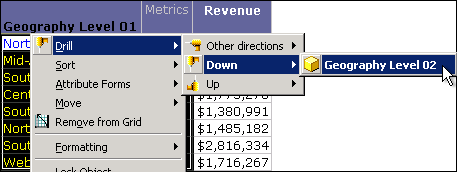
You can also drill up to country data or you can use the other drill path directions to drill to any other attribute available in the MDX cube.
You can create an MDX cube report that includes the Region attribute mapped directly to the Region characteristic in SAP BW. When you drill on this attribute, you can still drill to country data, but this is only available as an Other directions drill path.
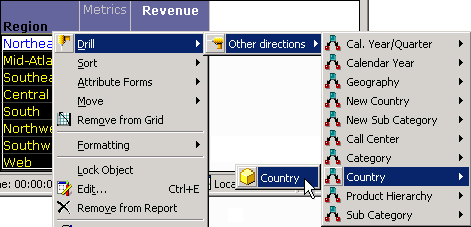
To enable up and down drill paths on your MDX cube reports, you must include the attributes that are part of a hierarchy during the mapping process. Including attributes that are mapped directly to characteristics enables drilling to the same set of attributes available in the MDX cube, but all drilling is available only through the Other directions drill path.