
MicroStrategy ONE
Employee Qualification by Division and Region
This report provides information on the regional and divisional distribution of employee job qualifications.
Usage scenarios
You are prompted to select a division and region. Once the report is displayed, you can use the page-by option for Division and Region to view the job qualifications obtained by employees in other divisions or regions.
Report layout and display
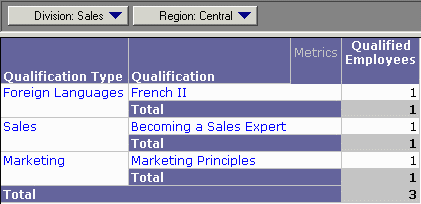
The report appears as a grid, with a page-by option for Division and Region.
Report details
| • | Qualification: You can place a filter on Currently Active Employees to count only those employees who are currently active. |
| • | Drill path: You can drill across to Employee details, such as name, ID, or title. |