
MicroStrategy ONE
Alert - Individual Salaries above Industry Range
This report lists any employees whose salary is greater than the industry maximum for the employee's level.
Usage scenarios
This report can be run before performing a salary adjustment, and you can select the year to view.
Report layout and display
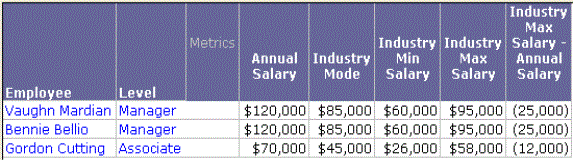
The report appears as a grid.
You can include thresholds in the Industry Max Salary - Salary column to highlight values above or below a selected number.
Report details
| • | Qualification: |
| ▫ | You are prompted to select a year to analyze. |
| ▫ | The report displays those employees with Employee Current Status Active, Maximum Salary - Salary < 0. |
| • | Drill path: No drill path is recommended. |