
Strategy ONE
Install Strategy for Google Slides™
Unless disabled by your administrator, administrators and users can deploy Strategy for Google Slides™.
-
In Google Admin left navigation pane, go to Apps > Google Workspace Marketplace apps > Apps list.
-
Click Install App and find the Strategy for Google Slides app.
-
Continue installation based on your needs. For more information, see Install an App for Users in Your Organization.
Validate Add-on Installation
To ensure the add-on is installed correctly in your Google Slides environment:
-
Open a new or existing Google Slide.
-
In the top navigation, click Extensions.
-
Click Strategy for Google Slides and Open.
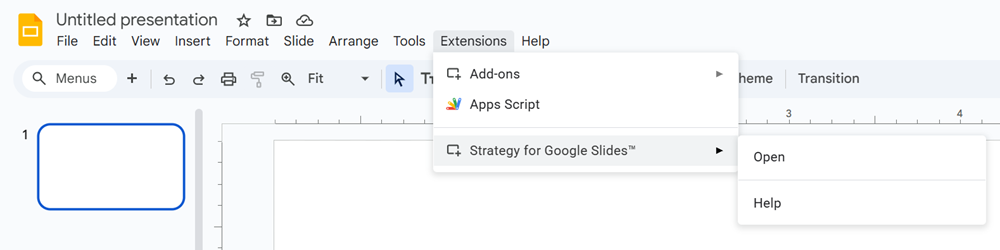
If the Strategy app opens, the add-on was installed successfully.