MicroStrategy ONE
Configuring Enterprise Manager Data Loader Service
After the warehouse creation is completed, the Data Loader service will need to be configured to point to the warehouse. If the warehouse creation was performed on the same machine as where the Data Loader service was installed, this step will be performed automatically by Configuration Wizard at the end of the warehouse creation process. Otherwise it will need to be performed manually via Service Manager on the machine where the Data Loader service is installed.
Steps to configure Data Loader Service
-
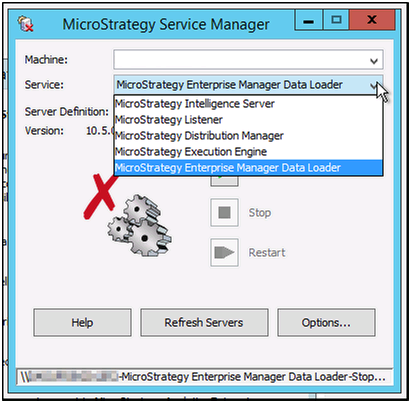
Open Service Manager and select MicroStrategy Enterprise manager Data Loader from the drop-down menu.
-
Click Options to open the Service Options dialog box.
-
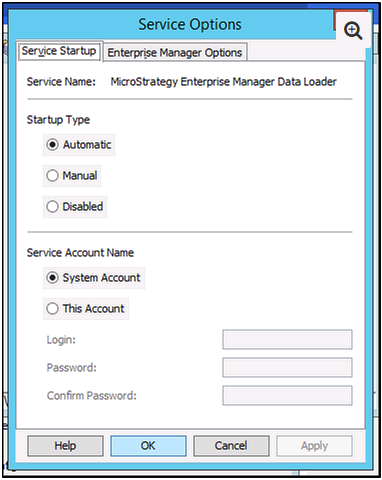
Apply any changes needed to the Service Account Name. Click Apply, then OK.
-
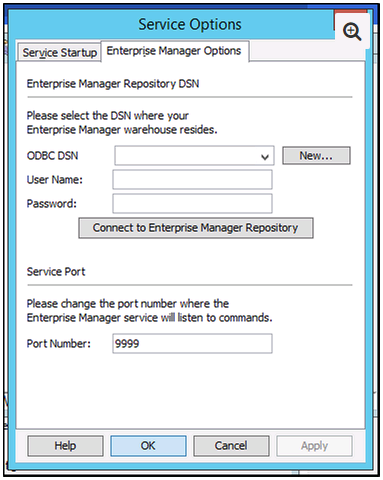
Select the Enterprise Manager Options tab and enter the DSN information for your Statistics and Enterprise Manager warehouse. If the DSN has not been created, click New and create the connection now.
-
Enter the log in credentials for the warehouse and click Connect to Enterprise Manager Repository to test your connection to the warehouse.
-
If you need to change the port that the Data Loader Service is listening to, enter it in the Port Number field and click Apply then OK.